

Table of Contents
Like our content?
Prefer us on Google.
Add as preferred Prefer us on Google.
source on Google
Beebole is a key staple of our back office operations.

There are a considerable number of project time tracking tools on the market. Because there are so many options, we’ve created this guide to today’s top project time tracking tools, making sure to include tools that offer features and price points to meet the needs of teams and businesses of all sizes.
TL;DR: What you’ll learn
Picking the right project time tracking tool shapes how well your team understands project costs, profitability, and resource use. This guide breaks down 20 top options so you can match features and pricing to what your team actually needs. We’ll cover:
- Why time tracking matters for finance and operations: How project time data feeds cost, profitability, and productivity insights, and why the “right” tool depends on which team is asking
- 20 tools compared side by side: Pricing, standout features, and pros/cons for 20 different tools
- What to look for before you buy: The reports, dashboards, and data-sharing needs to nail down before evaluating vendors
- Where Beebole fits in: How its customizable financial reporting, budgeting, and resource planning tools address the profitability and billing questions this guide raises
Project time tracking tools for various needs: Operations and finance teams
A project time tracking tool can be an incredibly useful tool for various departments, teams, and end goals. Whether you’re in operations and want an overarching view of your company’s team, projects, time, and productivity, or you’re in finance and hoping to drill down into project profitability, billable vs. non-billable hours, and various budgets, a project time tracking tool can help you get there. Ensure that your team is tracking time on tasks, projects, teams, or clients, and with this data, you can unlock invaluable insight on costs, project profitability, productivity, and more. This insight, of course, can lead to better business and resource planning, strategic decision making, and your company’s overall success.
When it comes to choosing a project time tracking tool in your company, it’s important to consider why you’re implementing it and what you’d like to get from it. What reports would you like to run, and what sorts of dashboards would you like to see with your time tracking data? How will you share the data and with whom? What decisions would you like to be able to make easier? The answers to those questions can help you make the right decision.
Now with that being said, there are hundreds of time tracking tools on the market. We’ve decided to take a look at today’s top project time tracking tools. We’ve chosen each of these tools based on their ability to enhance project financial management by understanding your team’s projects’ costs and time spent better. So without further ado, let’s have a look at today’s top contenders for project time tracking software.
1. Beebole
Who else would we put #1 on a list of the best project time tracking tools? We’re confident that Beebole offers one of the most flexible and reliable time tracking solutions on the market. Beebole was founded in 2008 and is used by organizations across industries in more than 60 countries. People can log time however works best for them — with a one-click timer, by dragging blocks on a calendar, from AI-suggested entries based on their own patterns, or by filling in a weekly timesheet grid. Track time against projects, tasks, clients, or custom tags, organized however makes sense for your team — there’s no rigid structure to work around. And since Beebole runs as a progressive web app, there’s no separate mobile app to install: open it in a browser on any phone, tablet, or desktop, and it works just like a native app.
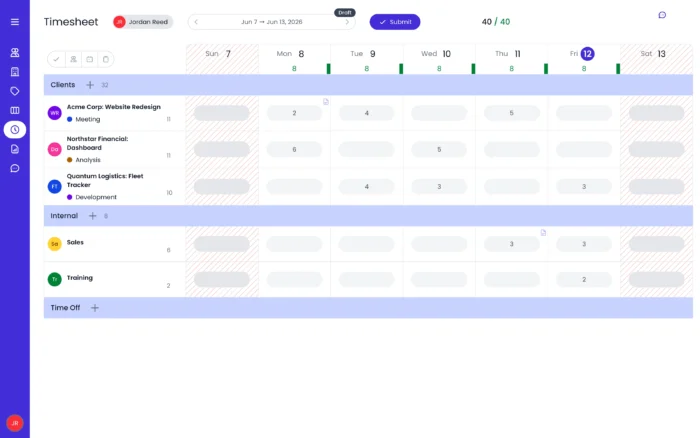
We know from our customers that Beebole makes a great addition to any project management team’s tech stack. Beebole offers key native integrations with tools like Google Sheets, Excel, QuickBooks Online, Google Calendar, Outlook Calendar, BambooHR, and Asana, and there’s a free API if you’d like to build something custom.
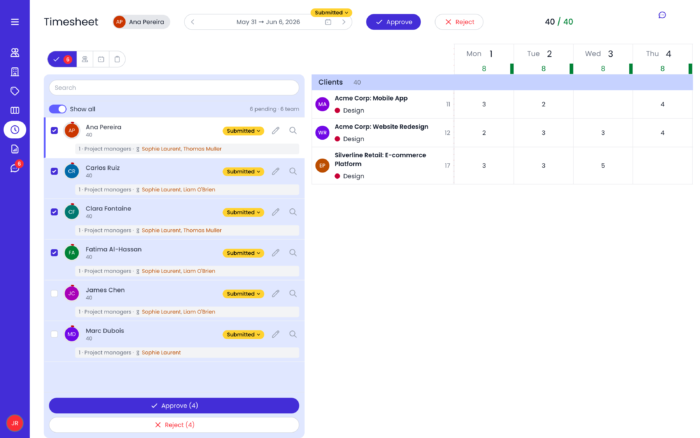
With Beebole’s multi-stage approval workflows, you choose the quorum — require every approver or just one per stage — and build the approval chain in the order you set: manager, then project lead, then finance, for example. Project managers and administrators can review, approve, or reject timesheets, and lock time records to close out a period — right from the app, or approve and reject directly from email.
Beebole also offers resource planning, so you’re not just tracking where time went — you’re planning where it should go next. Instead of assigning people to tasks based on guesswork, match team members using real-time data on their availability and utilization rates. Visualize the whole picture in a Kanban, Gantt, or staffing view, with planned tasks, workload, dependencies, and project overlap visible at a glance, and adjust assignments on the fly to rebalance work before a bottleneck forms.
Once a task is planned, it flows straight into that person’s timesheet, ready for a one-click confirmation or a quick adjustment — cutting manual time entry down to near zero. And because scheduled hours are compared against worked hours in real time, you can catch over-allocation or under-utilization early, before it turns into a missed deadline or a blown budget.
Billing rates and cost rates are just as flexible. Set them as fixed, hourly, or daily, and apply them at the person, project, task, or tag level — whichever matches how your organization actually bills and budgets. Rates carry effective dates, so when a client’s billing rate or a contractor’s cost rate changes partway through a project, you update it for the period going forward and Beebole keeps the historical calculations from before the change intact — no need to recalculate past margin by hand.
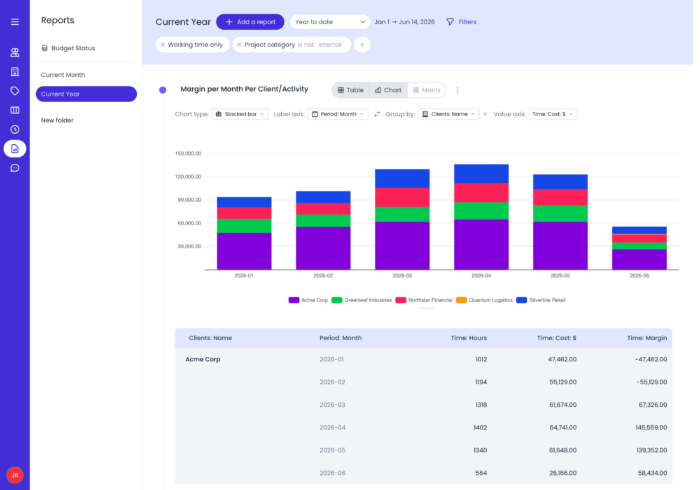
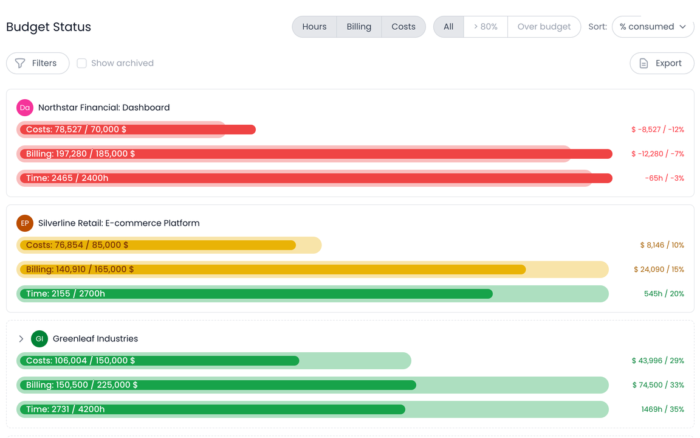
Beebole offers highly customizable and powerful reporting on employee time, project budget, margin, profit, and any other project financial reports you might need. Build any multidimensional report — combine cost, billing, rate, and time data, then filter and group by project, person, or custom tag. Beebole’s reports also dig into project costs, margins, and profits based on billable and non-billable hours, and the budget status report shows project health in real time — so you can catch overruns before they happen. If you’d rather not build one from scratch, Beebole’s report builder lets you describe the report you want in plain language, and it puts it together for you. These are the metrics that matter for precise project cost management. Save reports as templates for reuse, schedule them to land automatically in stakeholders’ or team members’ inboxes, print them, or use them for audits, billing, or to build trust with your clients.
Harvest has its reports, but with Beebole I have this flexibility to build the report I want, and that really helps me because I can play with data; I can transform it in in different ways, and that’s really helpful for me.
Beebole pricing
Beebole offers three plans, as well as a 30-day free trial, no credit card required.
- Free: Up to 5 users
- Essential: $9/seat per month billed annually, or $10 month-to-month
- Advanced: $18/seat per month billed annually, or $20 month-to-month, with everything included
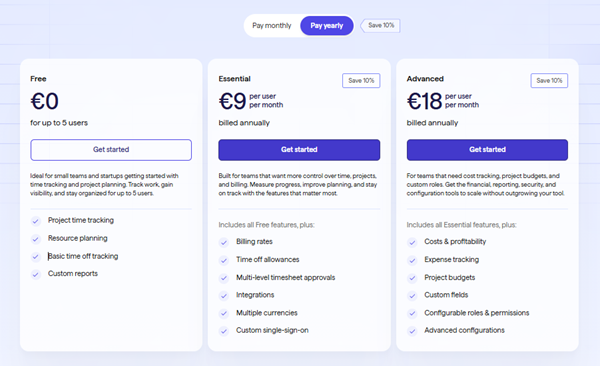 ), Essential ( per user per month) and Advanced ( per user per month) when billed annually” class=”wp-image-15041″/>
Pros:
- Flexible time tracking where you can log time with a one-click timer, calendar drag-and-drop, AI-suggested entries, or a weekly timesheet grid
- Resource planning offering Kanban and Gantt views, workload balancing, and task assignment based on availability and utilization data
- PTO management forvacations, time off, and leaves of absence, and easily load local public holidays straight into your team’s calendar
- Customizable reporting offers any multidimensional report you can imagine, combining cost, billing, rate, and time data, and filtering by task, client, person, tag, or project; Beebole’s report builder can also generate reports from a simple, plain-language description
- Multi-level approval workflows with quorum settings
- Built-in expense tracking alongside time and cost data
- Native integrations with QuickBooks Online, Asana, BambooHR, Google Calendar, Outlook Calendar, Excel, and Google Sheets, plus a free API for custom integrations
- Data encryption, SSO, and GDPR and DCAA compliant
- 10 languages and multiple currencies available
- Free plan for teams up to 5 users, plus a 30-day free trial (no credit card required) on paid plans
- Fantastic 1:1 onboarding sessions and in-app support (as per our customers’ reviews!) starting at paid plans
Cons:
- No integrated invoicing features
What Beebole users are saying
Beebole is very user-friendly and easy to set up and understand. Pulling reports is so incredibly simple that our team was able to figure them out without any training.
I can’t say enough about how easy and effective Beebole is for tracking time on projects. It is incredibly powerful yet simple to use. No one wants a “solution” that takes more time than the time-saving it is supposed to provide. For tracking projects and different scopes within a project, this is the easiest and most efficient use of my time. It gives us accurate and detailed information to include with client billing.
Beebole’s Google Sheets integration is the winner for us. I love that you can easily integrate with Sheets; it makes my reporting an absolute breeze. Two clicks and the latest data is imported and ready for interrogation; it makes Beebole a really powerful tool.
I generate several reports to look at timesheet data and easily export them to Excel.
Simplify Your Project Time Tracking & Run Financial Reports That Matter
2. Everhour
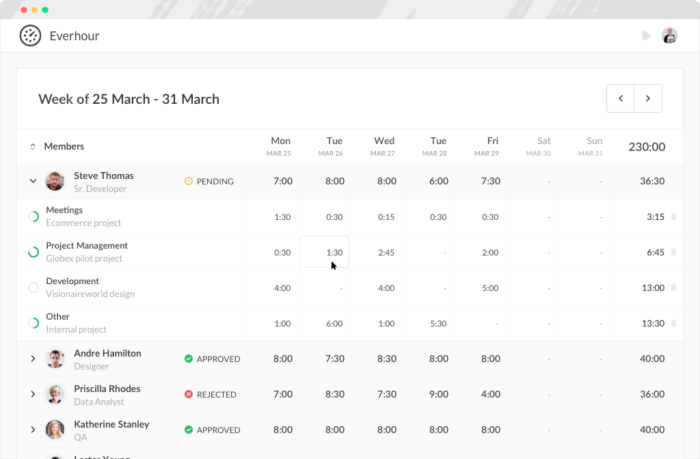
Everhour is a time tracking and workload management tool that gives clear visibility into how time is spent across projects and tasks. It’s best suited for small to mid-sized teams, agencies, and service-based businesses that need accurate time data, budgeting control, and reliable reporting.
Everhour offers integrations with popular project management and collaboration tools by embedding time tracking directly into the tools teams already use. It focuses on simple, accurate time tracking through timers and manual entries that feed directly into detailed timesheets and reports. Teams can track time against tasks and projects, compare logged hours with estimates, and monitor progress in real time. Everhour also includes budgeting features that help teams set project limits, track costs, and receive alerts when budgets are close to being exceeded.
Beyond tracking hours, Everhour provides tools for workload and capacity planning. Its reporting features support invoicing, payroll, and internal analysis, giving managers actionable insights rather than just raw time data.
Pros:
- Accurate time tracking with timers and manual entries
- Project budgets and cost tracking with alerts
- Team workload and capacity visibility
- Clear reports for billing, payroll, and performance analysis
Cons:
- Limited task management features on its own
- Best value comes when used alongside a project management tool
Pricing: Free plan for up to 5 users. Paid plans start at $8.50 per user per month, with budgeting, advanced reporting, and team management features.
3. Paymo
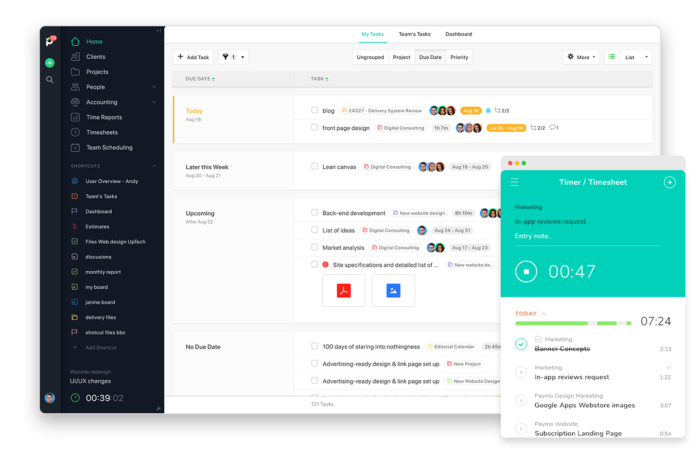
Paymo is an all-encompassing project management tool best suited for freelancers and small businesses. Paymo offers various features when it comes to accurate time tracking, including active timers, Pomodoro, comprehensive timesheets, and live reports.
With robust time tracking at its core, Paymo’s native web timer acts as a stopwatch for your tasks—you can easily make adjustments and add notes—which are then automatically turned into timesheets and can be sent as invoices straight from the platform. This is a helpful feature when it comes to managing projects and their related costs. Also, keeping time is simple and reliable on Paymo’s mobile app (iOS and Android) if you’re working away from your laptop. Plus, its desktop automatic time tracker “Paymo Track” smoothly runs in the background. At the end of your work day, simply assign time entries to your tasks.
Pros:
- Project time tracking with invoice capabilities
- Live reports that can be easily shared
- Resource management to manage workloads, availabilities, and time off
Cons:
- Non-intuitive user interface
- Limited data export options
- High price point
Pricing: Free for a single user or $4.95/month for freelancers. Small Office ($9.95/user/month) is the most popular plan for small teams, while the Business Plan ($20.79/user/month) accommodates larger teams.
4. My Hours
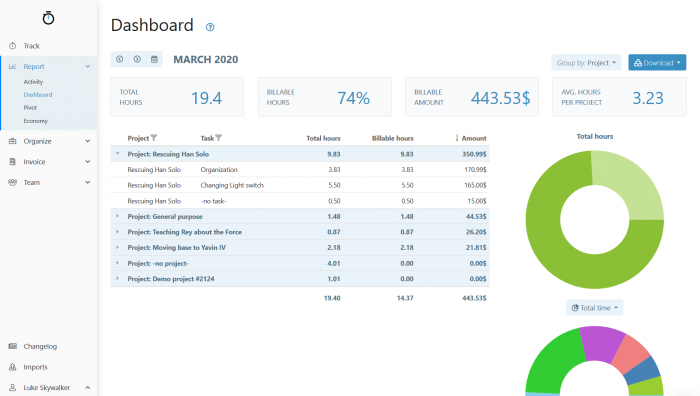
My Hours is a cloud-based time tracking system designed for small teams and freelancers. The platform lets you track time in real-time or manually, using the web platform or the mobile app for Android and iOS. Track time on unlimited projects and tasks, select billable or non-billable time, and add additional information to time logs. Administrators will be able to get an overview of all time logs in real-time.
Beyond time tracking, My Hours offers several features that help with project cost management. You can generate exportable reports, send personalized invoices to clients, and set custom billing rates by person, client, or project. Set hourly or monetary budgets for your projects and be notified when you’re close to reaching them. In addition, if you are looking for clock in/out and leave management solutions, check out My Hours’ sister product, AllHours.
Pros:
- Easy-to-use project time tracking
- User-friendly reporting
- Automated workflows with reminders and approvals
Cons:
- Lacks scheduling and resource management features
- Challenging to customize dashboard to exact needs
- Mobile app isn’t as useful as desktop app
Pricing: Basic plan free for unlimited users, $8 per active user per month for Pro Plan.
5. Jibble
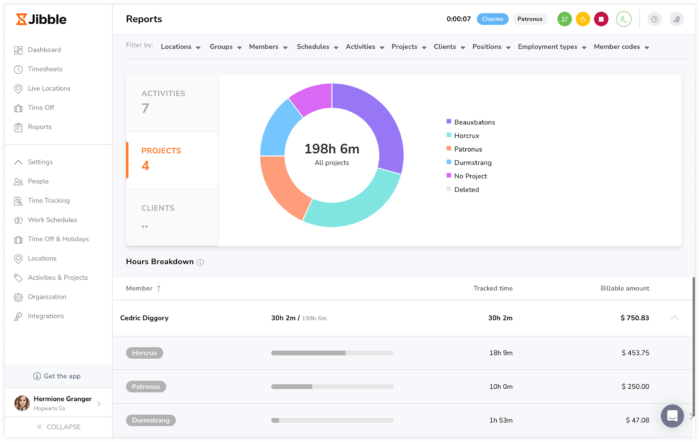
Jibble is an easy-to-use time tracking tool that helps teams track project hours accurately from anywhere. Time can be tracked directly against activities and projects from web, mobile, desktop, or a shared kiosk. Every hour syncs into detailed project reports that break down time by member, project, and date, giving managers a clear view of project progress and budgets. Even on Jibble’s free plan, teams get unlimited projects, clients, and activities, allowing organizations to set up as many projects as needed with no restrictions. Jibble also offers GPS tracking and face recognition, ensuring project data is accurate and reliable.
Jibble is used by companies in construction, healthcare, and education, including teams at Tesla, Harvard, and fast-growing AI firms. It’s quick to onboard, easy to manage, and scales smoothly from small teams to organizations with thousands of employees.
Pros:
- Free version with unlimited projects and clients
- Integrates with Slack, MS Teams, Xero, QuickBooks, and more
- Automated timesheets and exportable reports
Cons:
- Advanced permissions require paid plans
- Covers core scheduling but lacks deeper customization
Pricing: Free for unlimited users with custom pricing plan options for advanced cases
6. Desklog
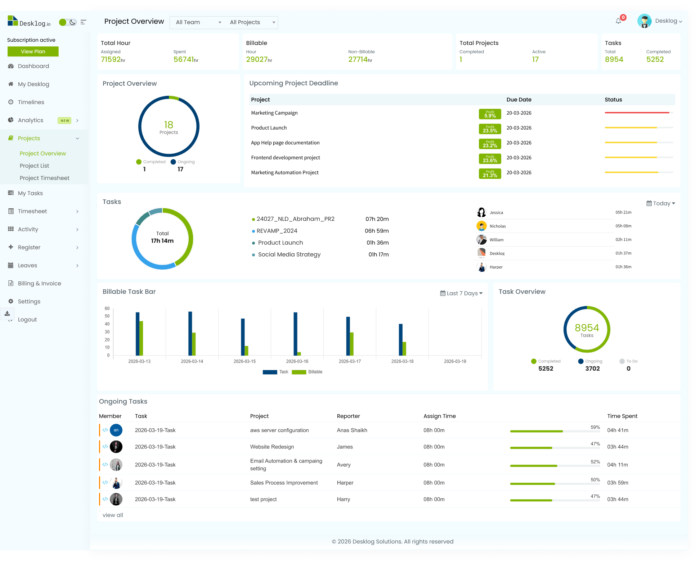
Desklog combines automated time tracking with financial insights to help businesses manage productivity and project profitability. It captures work hours through automatic background tracking, accurate clock-in/clock-out, and app & URL monitoring, giving teams a clear view of how time is spent.
Desklog also supports project billing and project profit & loss calculations, helping businesses convert tracked hours into billable amounts and analyze project profitability. Automated timesheets and customizable reports make it easy to handle payroll, invoicing, and financial decision-making.
Pros
- Free plan includes automated time tracking, timesheets, and unlimited users
- Built-in reporting with project billing and project profit & loss calculators
- Billable hours tracking to help evaluate project profitability
- Automated background time capture
- Offline tracking with auto-sync
Cons
- Advanced features and integrations require higher-tier plans
Pricing
- Free: $0, Free forever (unlimited users and projects)
- Business: $3.50 per user per month
- Enterprise: $4.80 per user per month
7. Timeneye
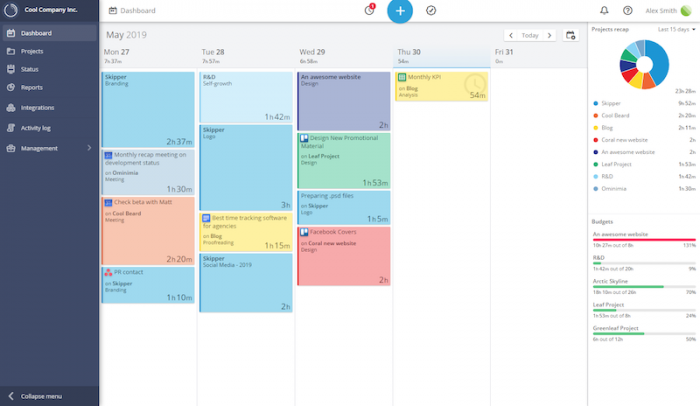
Timeneye was developed internally by a software agency back in 2013, so it was created with the needs of small businesses in mind. Today, the tool focuses on project time tracking, with options to track time manually or using a timer for different projects, phases, and clients. Tracking can be done via desktop or on their mobile apps for iOS and Android. What’s more, the tool learns about your work habits and automatically creates suggested time entries that you can accept or reject.
It’s easy to get a handle on your tracked activities using Timeneye’s customizable calendar-style dashboard. The reporting tools monitor project profitability, identify time sucks, and help your whole team to improve productivity—all of which are key metrics to understanding the financial stability of any project. Finally, Timeneye integrates with Asana, Basecamp, Breeze, Podio, ClickUp, Google Calendar, and more.
Pros:
- Simple time tracking
- Project management overview section
- Seamless integrations with both Microsoft and Google ecosystems
Cons:
- Limited mobile app functionality
- Reporting functionality is limited
Pricing: Free for a single user, $7 per user per month for Pro Plan.
8. TMetric
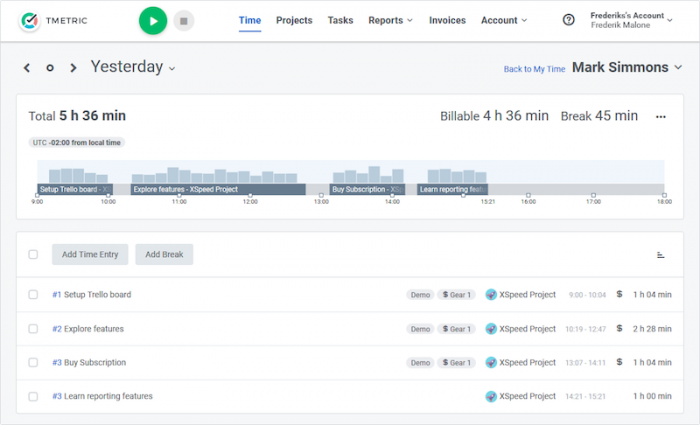
TMetric is an online time tracker for freelancers and teams of up to 100 people, developed by Devart. Devart has been offering database development and management software worldwide for more than 20 years. With TMetric, track working time and breaks with a timer or manually. It also features idle detection, offline mode, screenshots, and locked timesheets.
TMetric offers a mobile app for iOS and Android, as well as a range of integrations, including Asana, Assembla, Basecamp, Freshdesk, Jira, GSuite, QuickBooks, and more. Aside from time tracking, you can set budgets for projects and billing rates on people, projects, clients, and tasks. As you can imagine, this kind of in-depth reporting is key for project managers as they assess project profitability and overall success. Track time off, invoice clients, and unlock business intelligence with detailed productivity and time and money reports.
Pros:
- Automated time tracking
- Time off calendar and work scheduling capabilities
- Project management functionality with project overview option
Cons:
- App is bug- and error-prone
- Missing more budgeting and invoicing features
Pricing: Limited free plan for up to 5 users; Professional Plan for $5 per user per month; Business Plan for $7 per user per month.
9. nTask
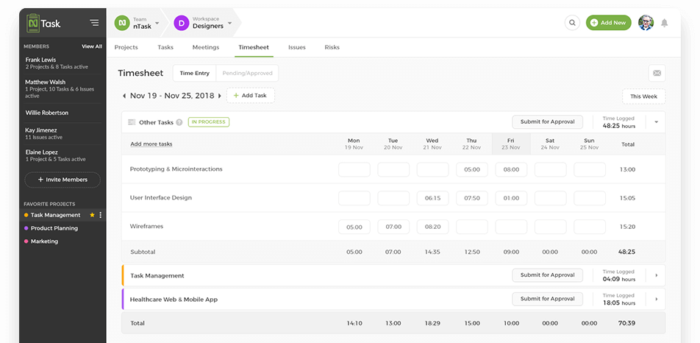
nTask is a robust project management platform that offers time tracking and timesheet features. Users can track time with automatic and manual time entries, including time estimates. This app can keep all of your projects and tasks in one place, ensuring you don’t miss out on anything for business success. For project managers who are worried about the financial health and status of projects, nTask offers various ways to analyze and understand exactly how a project is going.
The timesheet feature allows you to keep track of time for all tasks by each team member. Users can send the timesheets to managers for approval and easily export the timesheets to PDF files. nTask offers Android and iOS apps, as well as integration with Google Calendar, Outlook, Zapier, and Zoom. It’s a great tool to ensure project success and meeting deadlines.
Pros:
- Project management organization with Kanban boards and Gantt charts
- In-depth project management features for issue tracking, risk management, and reporting
- Project time tracking with manual time entry or automatic timer
Cons:
- Mobile app isn’t as easy to use as the desktop version
- Very limited customization options
Pricing: The premium plan starts at $3.99 per user per month, and the business plan starts at $11.99 per user per month.
10. OnTheClock
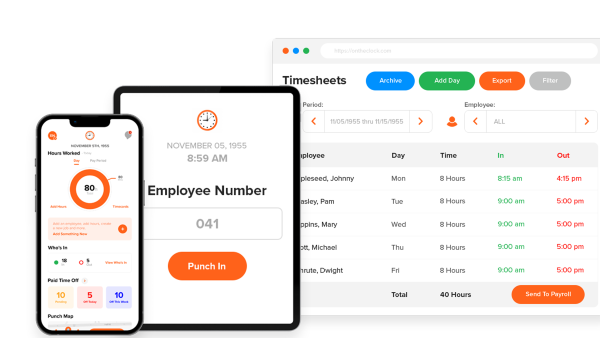
OnTheClock is a cloud-based time tracking system built specifically for small and medium-sized businesses that need simple employee time capture without enterprise complexity. The tool supports multiple ways for employees to clock in and out, including mobile apps, browser, kiosk, and authorized devices, with optional GPS tracking and geofencing for teams in the field. It’s popular with companies that need a straightforward system to manage time cards, overtime, PTO, and scheduling in one place.
Their platform offers managers a clear overview of who’s working, where they are, and what hours have been logged. Automated PTO accruals, shift scheduling, and built-in time card approvals help reduce admin time, while built-in payroll and/or integrations with major payroll providers streamline the entire payroll process. OnTheClock also includes audit trails, adjustable employee permissions, and review tools that help maintain accuracy and compliance.
Pros:
- Simple and intuitive for both employees and managers
- Strong GPS, geofencing, and device-restriction controls
- PTO, scheduling, and payroll built in
Cons:
- Not as focused on project-based time tracking as some competitors
- Advanced analytics and job costing may be limited for complex operations
Pricing: Time & Scheduling: $4 per employee per month + $5 base fee; Payroll Add-On: $6 per employee per month + $40 base fee
11. Apploye
Apploye is a comprehensive time tracking software that helps businesses grow from their core. As a time tracking solution, Apploye offers an automatic and manual timer, calculation of billable and non-billable hours, simple clock-in/clock-out from the mobile app, as well as additional features like Pomodoro timer and idle timer option. It also offers employee monitoring features including random screenshots, app usage, and URL tracking.
At its advanced level, Apploye can help manage multiple projects, allocate and track the budget progress, and pay employees according to the base you set for them (hourly or fixed), making it a commendable option for project managers who are looking for a project cost management tool. Apploye also offers a client management and project invoice generation system. Additionally, it helps you make teams, assign roles, add multiple organizations, and manage multiple tasks simultaneously.
Pros:
- Easy-to-use interface
- Accurate time tracking that includes both automatic and manual, as well as a clock-in and clock-out tool
- Attendance and leave tracking functionality
Cons:
- Screenshot tool not useful in project management setting
- Long wait time for new features to come out
- Dashboard lacking more customization options
Pricing: Available with four different pricing plans. Solo ($4/user/month), Standard ($5/user/month), Premium ($6/user/month), and Elite ($7/user/month). 50% discount offered on a yearly plan.

12. MinuteDock
MinuteDock is a simple and efficient time tracking service that is designed primarily for professional services and office-based teams. It works best with small- to medium-sized teams. MinuteDock integrates with popular accounting software services like Xero, Wave, and QuickBooks to sync client information and time tracked for the smooth transference of data and a simplified billing process.
MinuteDock users can use the accounting integration feature to generate invoices based on time entries and sync through generated invoices to their accounting system for a simple, smooth, and easy workflow from starting their jobs to billing their clients. This streamlined process all in one place makes MinuteDock a great option for project managers looking for a tool that simplifies managing projects from start to completion, including invoicing.
Pros:
- Intuitive interface that’s easy to use
- Reporting is easy to use and offers valuable insights
- Invoicing functionality
Cons:
- Glitch-prone when it comes to syncing data with customers on different devices
- Customers wish there were more built-in integrations
Pricing: Starts from $19 per month.

13. Yaware.TimeTracker
Yaware.TimeTracker is an ethical time tracking tool built for teams, managers, and HR professionals who value transparency, self-management, and a balanced approach to productivity. Unlike traditional tracking software focused on control, Yaware empowers organizations to gain meaningful insights into team performance without micromanagement.
Designed to improve project financial management, Yaware enables businesses to understand not just how much time is spent, but where and why it’s spent. This leads to smarter budget planning, more accurate project profitability analysis, and increased accountability across teams.
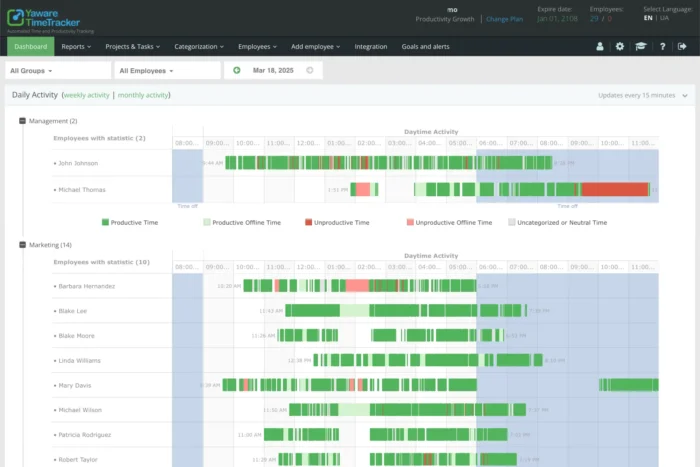
You can track time automatically across apps and websites, and compare productivity across departments and projects. Yaware also supports hybrid, in-office, and remote work tracking with intuitive reporting and analytics tailored for both operational and financial decision-makers.
Pros:
- Ethical, non-intrusive time tracking focused on growth, not control
- Visual productivity analytics for better project cost management
- Role-specific dashboards for managers, HR, and team leads
- GDPR-ready, data encryption, SSO
Cons:
- No built-in invoicing or client billing features
- Not designed for organizations seeking strict surveillance tools
Pricing: Starting at $4/user/month with a 14-day free trial. Custom enterprise plans available on request.
14. DeskTime
DeskTime is an all-in-one productivity tracking, shift scheduling, and invoicing tool for solo entrepreneurs and companies. With the help of DeskTime, you can follow your team’s daily activity, better organize sick leaves, vacation days, and overtime, as well as get a clear overview of your workflow.
DeskTime offers informative productivity graphs and statistics for analyzing your own productivity, or the efficiency of the whole company, a certain team, or a certain employee. You can also see which are the most frequently used unproductive apps, as well as which parts of the day are the most (or least) productive.
The app is fully automatic; there’s no need to log in every day, risking forgetting to clock in or clock out. Just switch on the computer and DeskTime starts working in the background.
Pros:
- Automatic project time tracking
- Project cost calculation and billing system
- Pomodoro timer
Cons:
- Too heavy of a focus on employee monitoring with screenshots, and app and URL tracking
- Analytics and reporting are clunky and cumbersome
- Finicky app with crashes
Pricing: Limited free plan for 1 user, and the pro plan is $7 per user per month. Discounts are available for bigger teams and annual plans.

15. Time Analytics
Time Analytics is an online timesheet tool designed to help users keep track of billable and non-billable hours. The software allows time tracking per client, employee, task, and project, and improves the profitability of projects. Each of these components helps manage time and resources more accurately and increase productivity, profitability, and efficiency. With these metrics in mind, Time Analytics is a great example of a tool that enhances the financial management of any project.
Apart from understanding the financial health of various tasks and projects, you can also discover the time utilization rate for each employee, the most valuable clients, and more.
It takes every employee a few minutes a day to fill out the timesheet, thanks to a simple workflow and timesheet templates.
Time Analytics integrates with Microsoft Excel, making it a perfect invoicing assistant.
Pros:
- Simple, intuitive user interface
- Start and stop timer for easy time tracking
Cons:
- No offline time tracking option
- No option to manage time off or leaves
Pricing: Limited free plan for up to 5 users; Starter Plan for $4.99 per user per month; Optimum Plan for $6.99 per user per month; and Premium Plan for $12.99 per user per month.
16. Insightful
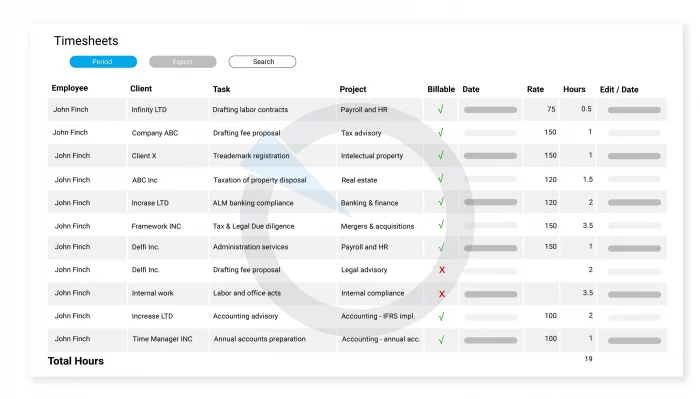
Insightful is time tracking software designed for all types of teams—remote, in-office, and for many different industries. It lets employees track time on individual tasks within the project, allowing you to see the exact number of billable hours, as well as productive hours during the workday. If you’re concerned about optimizing the financial management of projects within your organization, having access to this sort of data is key.
A neat feature is the Client Login option, which allows clients to log in to Insightful and only see the data related to their projects. This feature allows for better transparency and ultimately improved client relationships. Additionally, Insightful can serve as a productivity tracking tool, as well as the clock-in/out software.
Pros:
- Easy to visualize project management with Kanban boards
- Real-time monitoring available
- AI-powered automatic time mapping
Cons:
- Intrusive employee screenshots
- No mobile app
- User interface isn’t very intuitive
- Frequent time recording errors
- Discrepancy between system time and clock-in time, which takes up to 24 hours to synchronize
Pricing: The cost is $8 per employee per month, or $6.40 per employee for annual payments. Special pricing is offered to enterprise clients.

17. Calamari
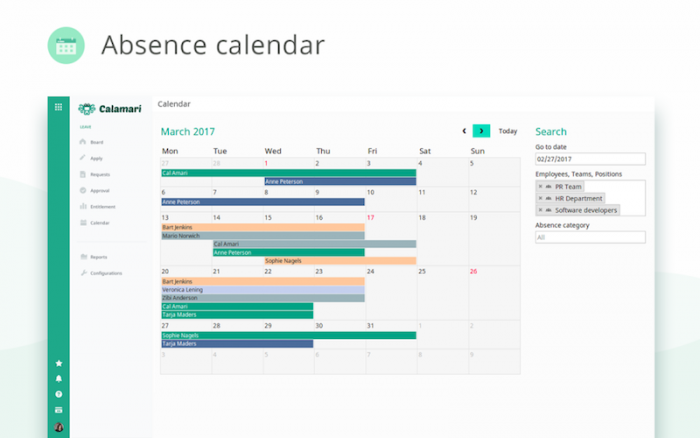
Calamari is a people management solution that offers two modules: clock in/clock out and leave management. Users can subscribe to the individual module they need, or both. With the first module, employees can clock in and out using a variety of methods, including iBeacon technology, QR codes, their iOS and Android apps, or even via Slack. Track breaks, billable and non-billable hours, and time against projects. Managers are notified when employees modify or update time entries, and can easily approve or reject changes. These notifications can ensure that project managers are up to date on the latest development of projects, which of course is crucial when it comes to measuring project progress and success.
With leave management, automate PTO calculations and requests, as well as vacation and remote work. Synchronize time off requests with GSuite Calendar, Office 365, mobile apps, and other calendars using iCal feed. You can even set separate time-off policies for employees in different countries. Calamari is multilingual and compliant with labor legislation in more than 70 countries.
Pros:
- Built-in integrations with Slack, Asana, Google, Office 365, MS Teams, and more
- User-friendly app that’s easy to navigate
- Leave and absence management
Cons:
- Steep initial learning curve to set up the tool
- Invoice management not included
- Reporting can be overcomplicated, making it difficult to get the exact information you need
Pricing: Leave management for $10 per month and clock in / clock out for $20 per month for the first 10 users. You can calculate costs based on team size on their website.
18. Intervals
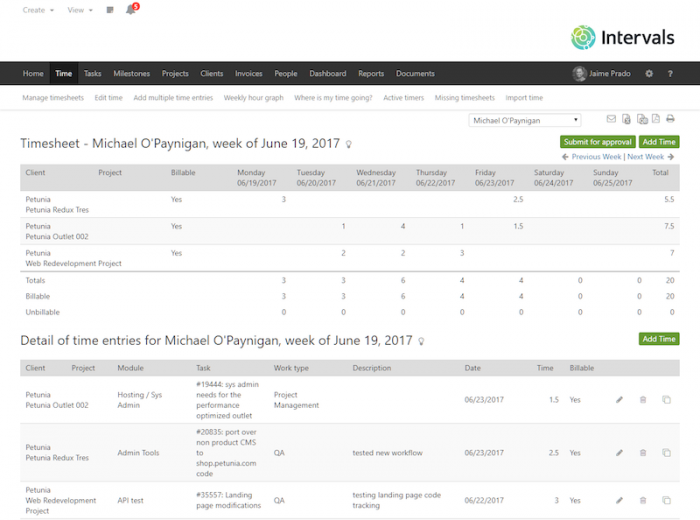
Intervals is a time tracking and task-management platform designed for small businesses. It is itself “a small business that knows the struggles small teams face managing projects, executing good work, and keeping track of your most precious resource…time.” Their time tracking tool includes integrated task timers, weekly timesheet submission and approval, automated reminders, and a mobile app for Android and iOS.
Apart from tracking, Intervals also offers task and project management. View work history and notes for tasks, with daily task assignment via email, deliverable milestones, and drag-and-drop rescheduling. You can create personalized invoices, including details on work done and automated overdue alerts. Businesses in over 100 countries are already using Intervals, including clients like Warner Bros, NBC Universal, and Ghirardelli Chocolate.
Pros:
- Reports can be scheduled to be automatically delivered
- Time tracking includes custom categories, which helps when creating detailed reports
- Task management control features
- Detailed reporting features, including Gantt charts and real-time graphing
Cons:
- Very few built-in integrations
- Doesn’t automate employee payroll
- Expensive pricing plans
Pricing: They offer a range of plans starting from $29 per month up to $259 per month. Pricing depends on the number of active projects and additional features like document storage.
19. Elorus
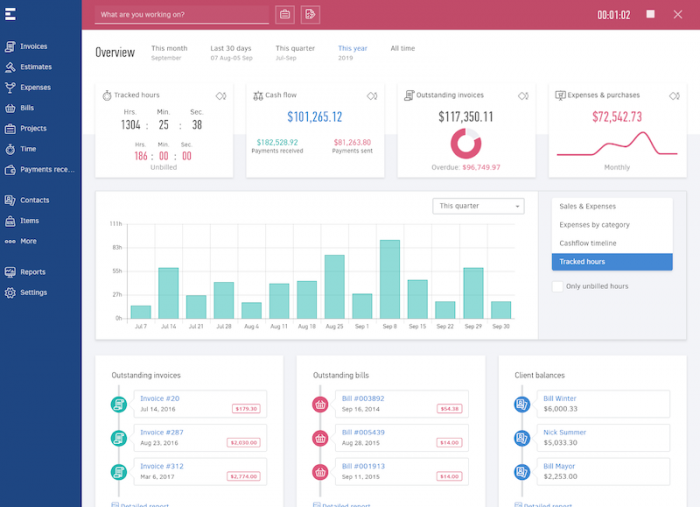
Elorus is the perfect tool for freelancers and small businesses looking for time tracking and invoicing all in one place. Track billable and non-billable time for projects on a daily or weekly basis, and view timesheets by project, task, or assignee. With Elorus’ browser extension, you can also get an overview of who is currently working on what. What’s more, with their client portal your customers can check project status, invoices, estimates, and view their transaction history. They can even make payments using a variety of integrated payment providers.
With Elorus, you can record expenses, set recurring expenses, and upload receipts and link them to projects. Finally, create professional-looking and branded invoices in seven languages and any currency with automated, up-to-date exchange rates. Schedule recurring invoices and receive notifications when invoices have been viewed.
Pros:
- Start and stop timer makes project time tracking simple
- Project overview gives complete project snapshot
Cons:
- Pricing plans on the expensive side
- Complicated navigational features
- Invoice templates and customization options could be improved
Pricing: Invoice up to 5 clients for free; $9 per month +$6 per user for invoicing up to 50 clients; $19 per month +$6 per user for up to 100 clients; $39 per month +$6 per user for unlimited clients.
20. TIMEDOCK
TIMEDOCK is great if you are looking for a system for employees to clock in and out in person. This New Zealand-based business offers swipe card mobile time tracking, ideal for employees in construction, agriculture, retail, hospitality, and more. You can use TIMEDOCK’s mobile application to scan ID cards on any mobile device or have them send you a mountable TimeTablet.
With the TimeTablet, which comes with 30 programmable ID cards, administrators can add new jobs and activities online. Workers then swipe their cards to clock in and choose from the available list of activities. All data syncs with the online dashboard in real time, and can be integrated with more than a dozen payroll platforms. The tool offers exportable reports and timesheets, offline time tracking, and GPS tagging as well.
Pros:
- Easy installation and set-up process
- In addition to project time tracking, also offers project management features like Gantt charts, templates, budgets vs. actuals
- On-site time tracking device available
Cons:
- No automatic reporting features available, and the reports that are available are limited
- High price point
- Tracking billable vs. non-billable hours not available
- Missing leave and absence tracking
Pricing: $5 per active employee per month, or contact them for Enterprise pricing.

Choosing the right project time tracking software
There’s obviously quite a lot to consider when it comes to choosing a project time tracking tool that will enhance your project management and financial needs. Whether you’re on the operations or financial side of things, there’s no denying the fact that the data collected with a time tracking tool can be used for deeper insights and better business decisions.
If you’re still unsure which tool to choose, don’t miss the in-depth resources we’ve put together to help ease your decision making. These project time tracking tool analysis pages help you see side by side exactly how Beebole stands up to each tool. And you can also download this scorecard to easily compare different project time tracking tools that you’re considering.
Ready to see how Beebole can help your business thrive?
Sign up for free today, or schedule a quick call to discuss your business needs.
—
Photo by Bruce Mars on Unsplash

Managing Inbound and Customer Success at Beebole. Connecting with teams and managers worldwide, identifying their obstacles, and communicating the creative solutions that Beebole can offer. Working remote from the Canary Islands.
Comments
Related posts

“Automation for finance and accounting is a must.” An interview with Packlink’s CFO.
For Noelia Podadera, Chief Financial Officer at Packlink, big data and automation for finance are keys to competing in the high-growth delivery industry. She shares these and other insights in this instalment of The CFO Journal, a series featuring financial leaders from around the world. Who is Noelia Podadera? Where: Packlink is an online shipping […]
Actual, planned, and earned time explained (with examples & best practices)
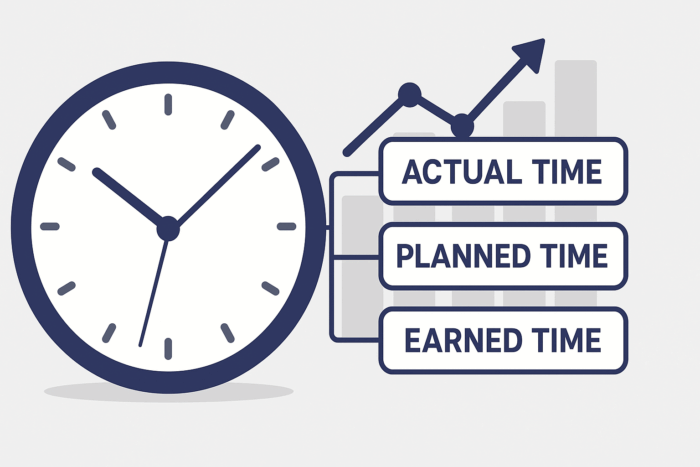
In project time tracking, it’s crucial to understand the difference between actual time, planned time, and earned time. Think of these three metrics as lanes in a swimming pool — each moving you forward, but at a different pace and with a different story to tell about your project’s progress. On their own, they can […]

The death of the project management triangle
If you’re remotely interested in project management, then you’ll likely be quite familiar with the scope-budget-time project management triangle. As with many tried-and-true ideas and theories, sometimes it can be good to hit refresh and come at it from a new angle. And that’s what I’d like to do today—let’s have a look at the […]
Hey, you have shared a great list of time tracking apps. Thanks for sharing. keep sharing 🙂
Great list of the tracking apps! I’d like to share an app that we use at work for tracking, and it’s been good while working remotely. It’s called workvector.com
Easy to use, and great to manage tasks organization.