

Billing rates are available on paid Beebole plans. Who can view and edit them is controlled by the Billing rates permission — see Roles & permissions.
Managing cost and billing rates in Beebole
Billing methods
Each billing rate uses one of four methods:
You pick the method in the rate card, under Billing method.
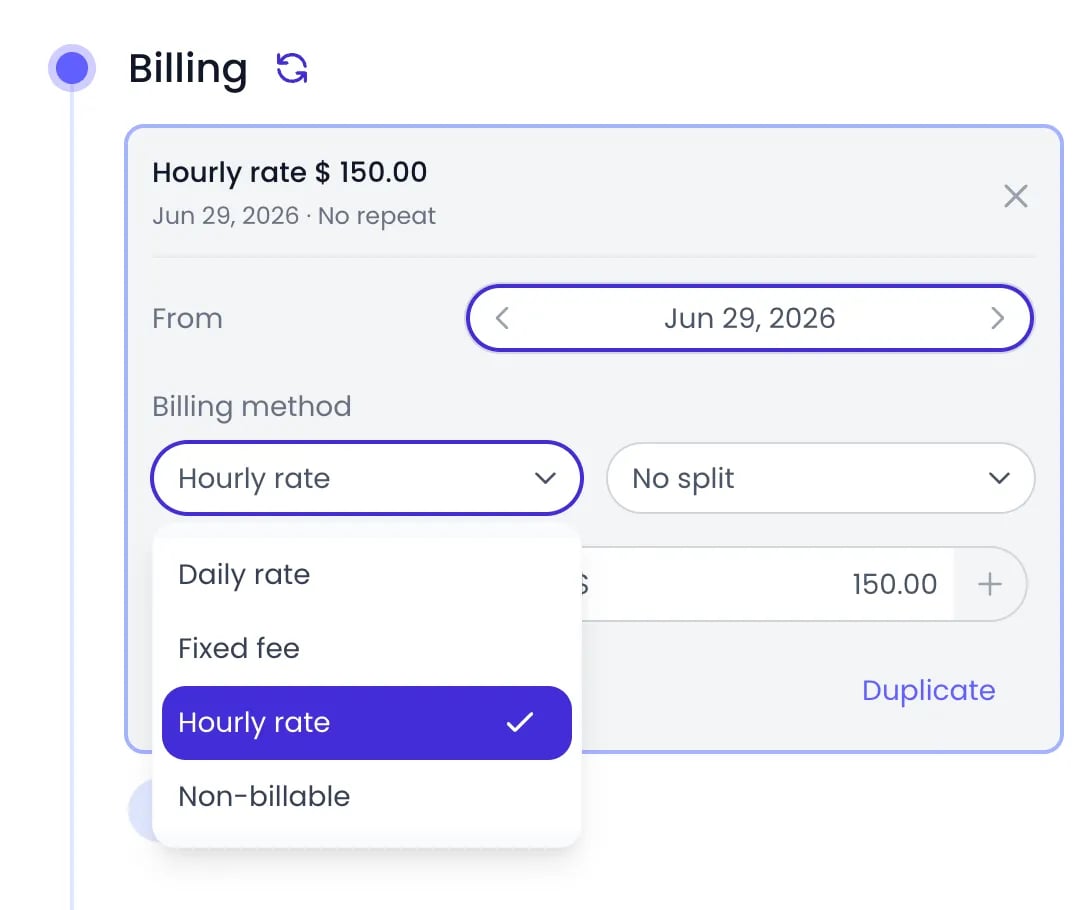
The four billing methods in a rate card
Where to set billing rates
Billing rates live in the Billing section of the organization, tag, project, or person settings panel. You can set them at four levels: organization, tag, project, and person.
To open the Billing section at each level:
- Organization — click the button with your initials at the bottom of the sidebar, then go to Settings > Account Settings.
- Tag — click Tags in the sidebar, then the tag’s name.
- Project — click Projects in the sidebar, then the project’s name.
- Person — click People in the sidebar, then the person’s name.
Adding a billing rate
1
Open the Billing section
In the settings panel, scroll to Billing.
2
Add a rate
Click Add to create a new billing rate.
3
Set the start date
Pick the From date — the date the rate takes effect.
4
Choose the method and amount
Select a Billing method and enter the Amount with its currency. Changes are saved automatically.
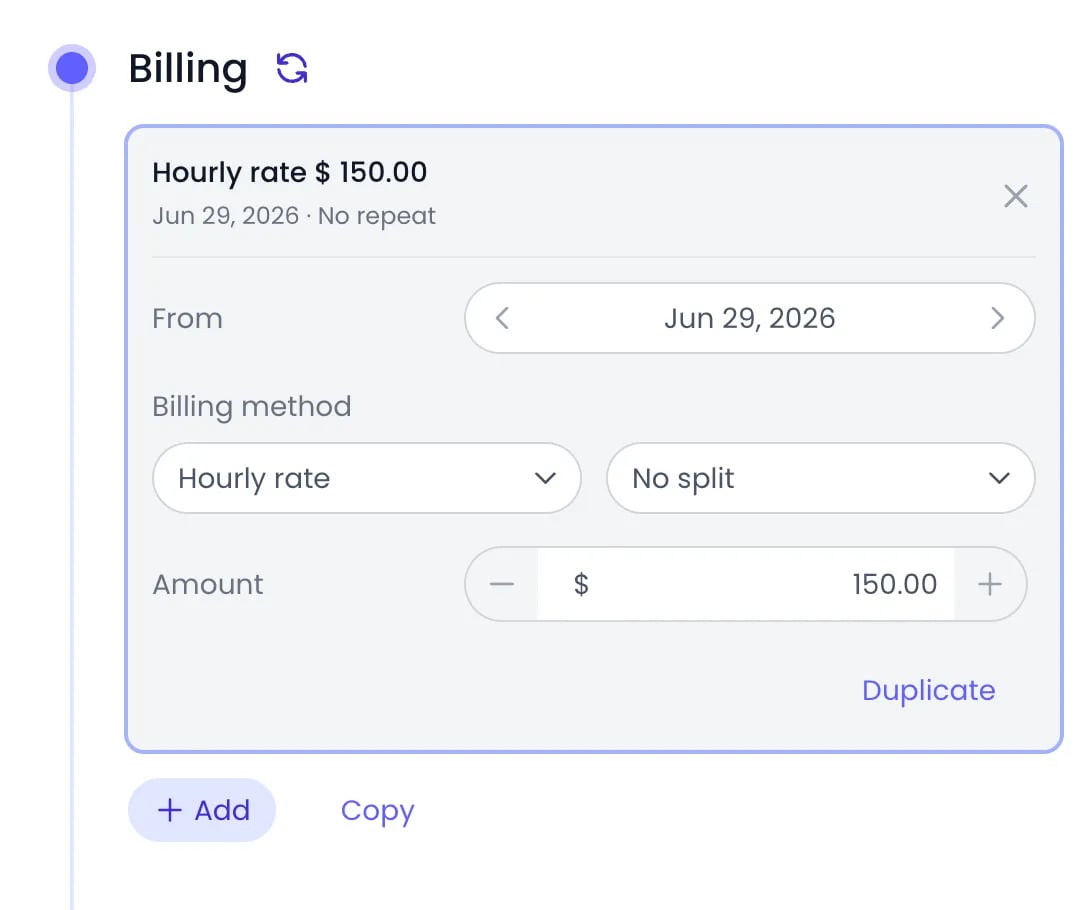
An hourly rate of $150 on a project, opened to show its fields
Rates set on the organization or on a tag cascade down: a project or person without its own rate shows the rate it inherits. Adding a rate directly on the project or person overrides the inherited one.
Which rate applies to a time entry
When several billing rates could apply to the same time entry, the most specific rate wins. For each entry, Beebole looks for a rate in this order:- The project the time was logged against — starting at the deepest subproject and walking up the project hierarchy.
- The person who logged the time — used when no project in the chain has a rate.
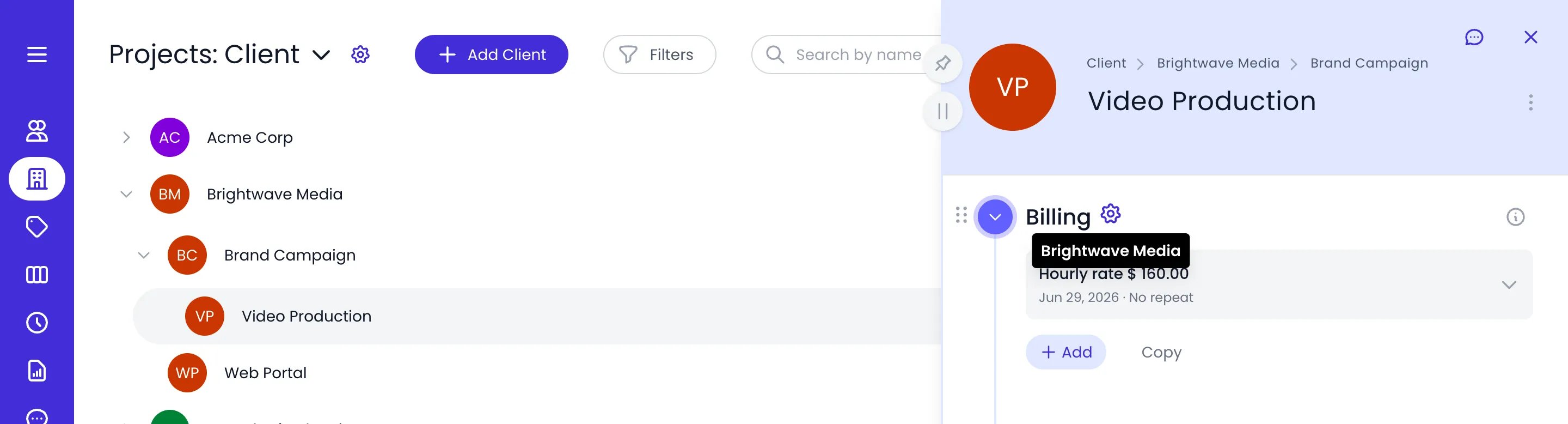
Video Production has no rate of its own: it inherits $160 an hour from its client, Brightwave Media
Rate splits
With an Hourly rate or Daily rate, you can replace the single amount with a separate amount per person or project. The split options are:- No split — one amount applies to everyone.
- Split by persons — a separate amount for each person you add to the list. Available on organizations, tags, and projects.
- Split by projects — a separate amount for each project you add to the list. Useful on a person or tag whose work is billed differently per project.
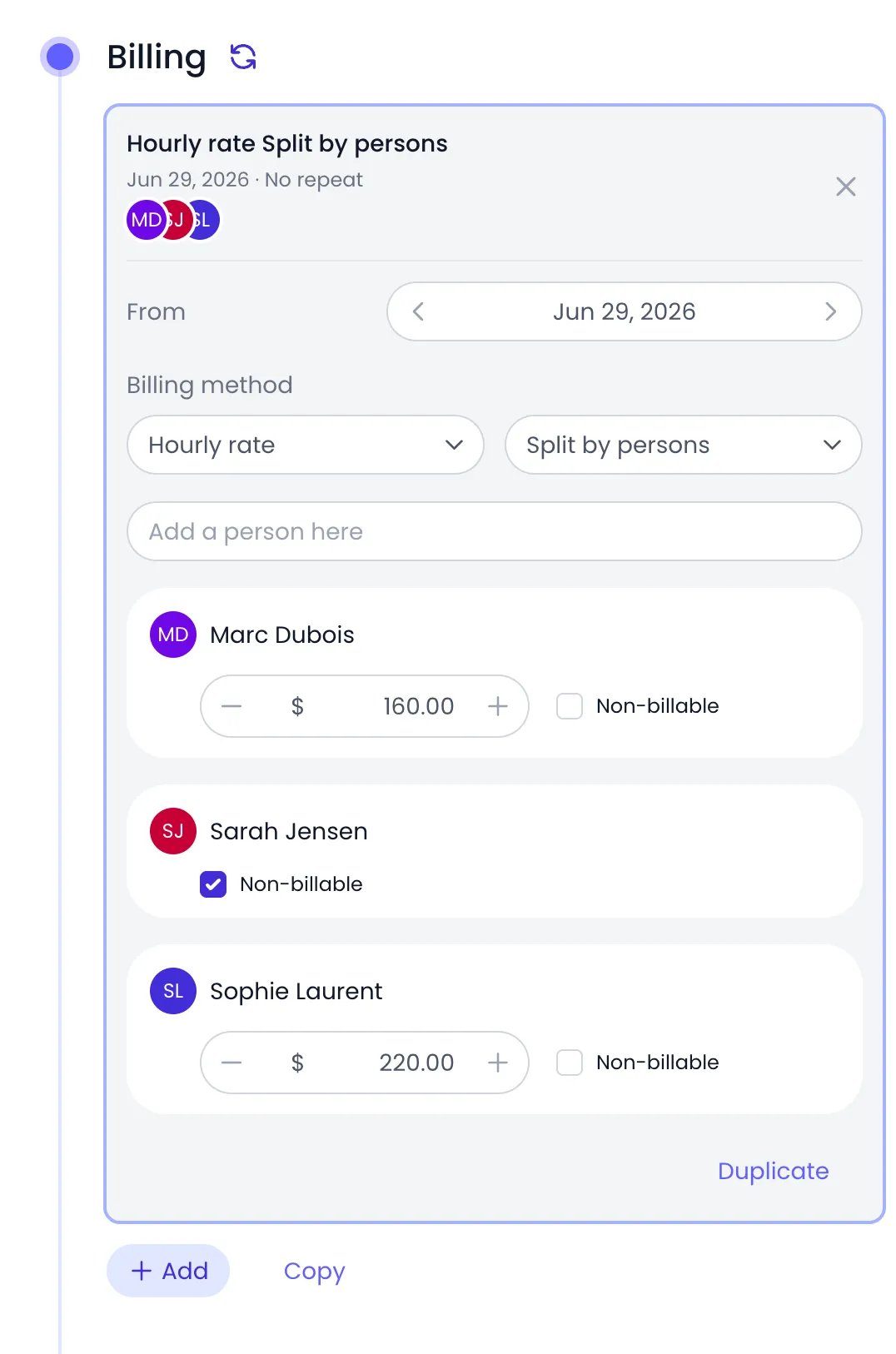
A client's hourly rate split by persons, with one person non-billable
Changing rates over time
Each billing rate has a single From date. The rate applies to time entries dated on or after that date, until a rate with a later From date takes over. To raise a project’s rate from January 1, add a new rate starting January 1 — entries before that date keep the old rate, with no recalculation needed. You can also click Duplicate inside a rate card to copy an existing rate as the starting point for the new one.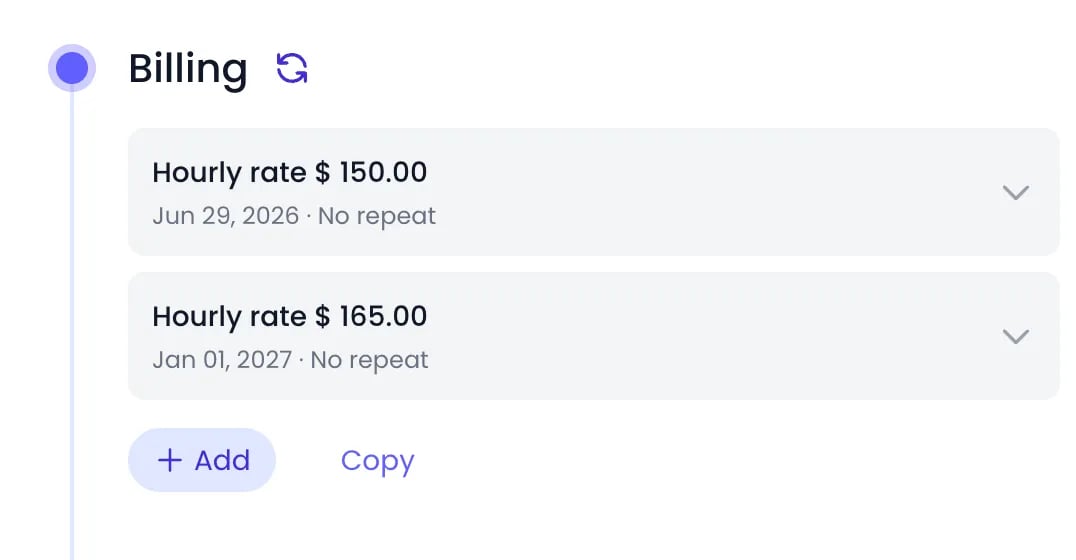
Two rates on one project: $150 an hour from June 29, then $165 from January 1
Recurring fixed fees
A Fixed fee applies once. To bill it repeatedly — a monthly retainer, for example — turn on Repeat in the rate card and choose how often it recurs: Every 1 or more days, weeks, months, or years. For a monthly fee, the last field sets the day it falls on, such as Every 1st of the month. A repeating fee has no end date.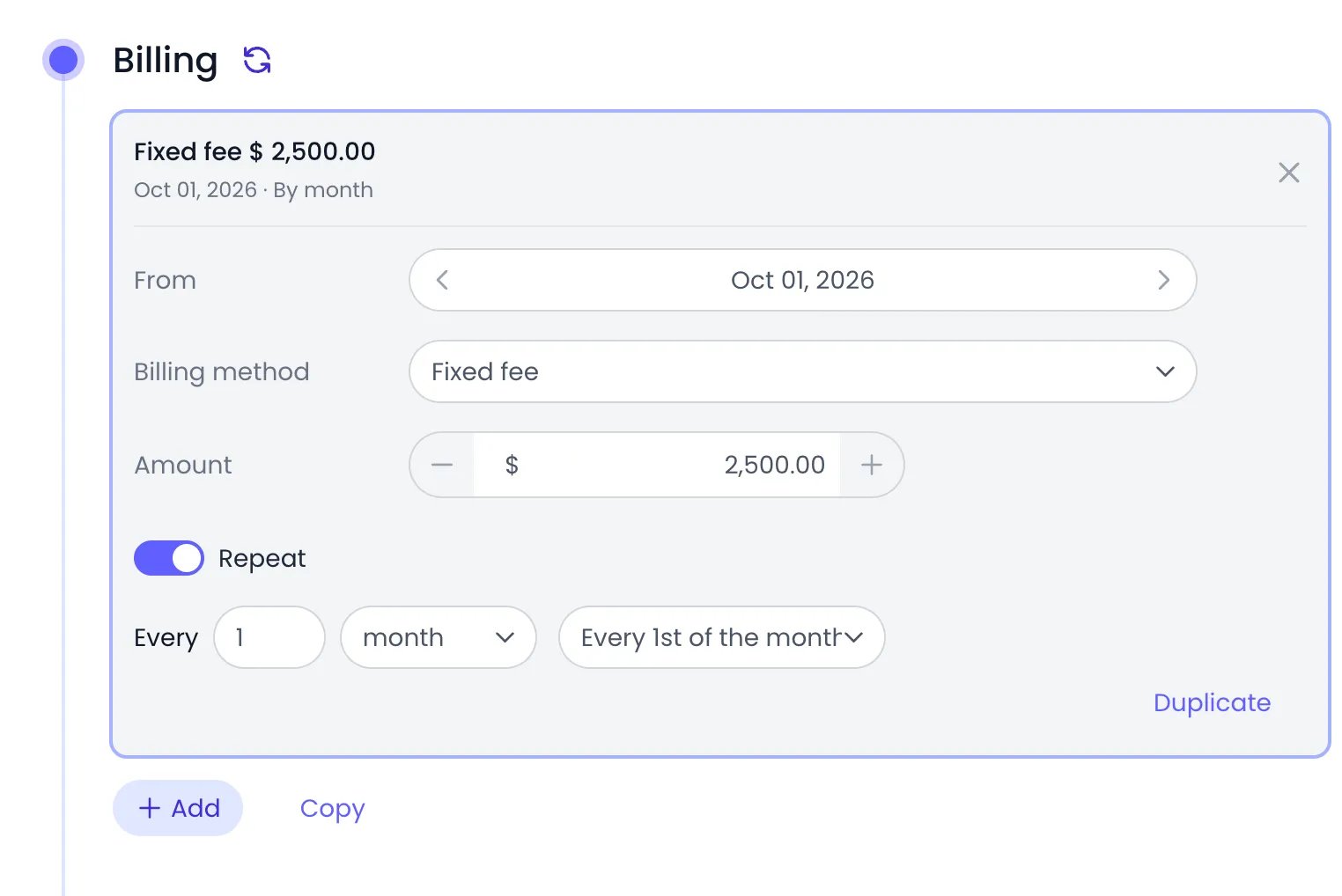
A $2,500 fixed fee repeating every month
Billing in reports
Tracked time is multiplied by the resolved rate and shown in reports. In a custom report, add the Billing column to see billable amounts, and group by project, person, tag, or period to analyze revenue from any angle. When cost rates are configured too, the Margin column shows billing minus cost.Related content
Cost Rates
Track what the same work costs you internally and measure margins.
Budgets
Set billing, cost, and hours targets on projects and monitor progress.
Custom Reports
Build reports with billing and cost columns, grouped and filtered your way.
Projects
Create and organize the projects and subprojects your team bills time to.
Frequently asked questions
What happens if no billing rate is set?
What happens if no billing rate is set?
Beebole calculates no billing amount for that time. The hours still appear in reports, but the Billing column stays empty for those entries until a rate at some level applies to them.
Can I bill the same person at different rates on different projects?
Can I bill the same person at different rates on different projects?
Yes. Set a billing rate on each project — project rates take priority over the person’s own rate in Beebole. On a single project, use Split by persons to give each team member their own amount.
Can I set a billing rate on a specific task?
Can I set a billing rate on a specific task?
No. In Beebole, billing rates are set on the organization, tags, projects, and people. Time tracked on a task is billed through the rate of the projects the task is linked to, or the person’s rate.
How do I change a rate without affecting past entries?
How do I change a rate without affecting past entries?
Add a new rate with a From date set to when the change starts. Beebole applies each rate only to time entries dated on or after its From date, so earlier entries keep the previous rate.
How do I mark work as non-billable?
How do I mark work as non-billable?
Choose the Non-billable billing method on the relevant project, person, or tag, or tick the Non-billable checkbox next to a person or project inside a rate split. Beebole then calculates no billing amount for that time. To exclude a single time entry, tick Non-billable in its entry details on the timesheet.