
Table of Contents
Like our content?
Prefer us on Google.
Add as preferred Prefer us on Google.
source on Google
Beebole is a key staple of our back office operations.

Plan resources, track time, and see project financials — all in one place
In the last 18 years, we’ve been listening to our customers. There was a common thread throughout all of our demos and conversations: project plans in one tool, time tracking in another, margin calculations in a spreadsheet. This wasn’t because teams preferred it that way, but because no single tool connected all three without integration overhead or missing data.
What we rebuilt is the solution to all of those issues: a project time tracking tool where you can now plan projects and also manage tasks, track project margin visibility, set dependencies, allocate resources, and track time directly against those plans, all within a single platform.
TL;DR: All of Beebole’s new features
After 18 years, we rebuilt Beebole from the ground up — unifying everything in one platform. Here’s what to expect in the new tool:
- Timesheets: Period-based submission, percentage-of-day logging, timesheet scoring, auto-submit, and admin edit permissions
- Approvals: Multi-stage chains with quorum settings; approve/reject directly from email
- Resource planning: Integrated Gantt & Kanban views, task dependencies, and planned hours that flow straight into timesheets
- Project financials: Real-time budget status with planned vs. actual visibility
- Structure & tagging: Unlimited project hierarchies and custom tags for flexible reporting
- Expenses & absence: Expense tracking against project budgets, plus auto-fetched public holidays globally
Rebuilt from the ground up
The decision to rebuild Beebole from the ground up wasn’t taken lightly. Throughout the years, we made small changes and grew with our clients, but the feedback from project managers, finance teams, and operations leads told us the same story: the old version couldn’t connect resource plans to timesheets without a manual handoff or configuration.
So, we rebuilt the entire platform. Not only will you see a new, modern interface, but the underlying architecture has also been reimagined. Beebole combines time tracking, project financials, absence management, expense tracking, and reporting in a single platform — all without the integration overhead of stitching separate tools together.
Planning, tracking, and reporting in one place: What it really looks like
Follow one project through Beebole to see how planning, time tracking, and reporting work together. Each step below uses the data from the step before it, so the plan you build at the start becomes the baseline you report against at the end.
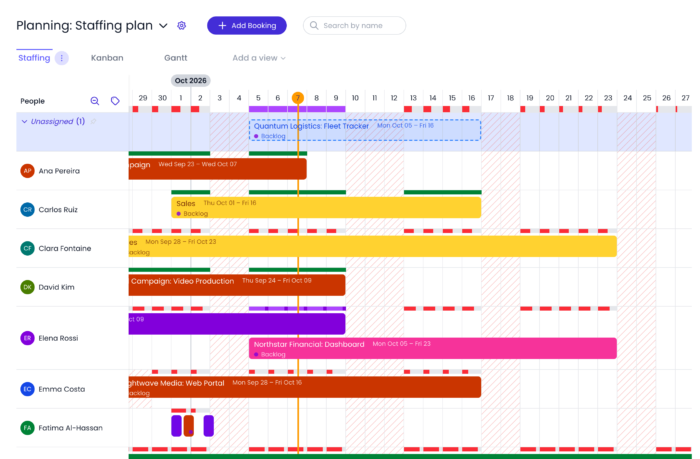
1. Staff the project in the Staffing view
In Beebole’s Staffing view, you plan who works on which project and when. Drag on the timeline to create a booking for a person, then set the percentage of their time it takes. Each person’s workload and remaining capacity stay visible as you plan, and over-booking flags show when you’ve booked someone beyond their capacity. To fill a gap, the “who’s free” search finds people with room for more work.
2. Planned work arrives in the timesheet as suggestions
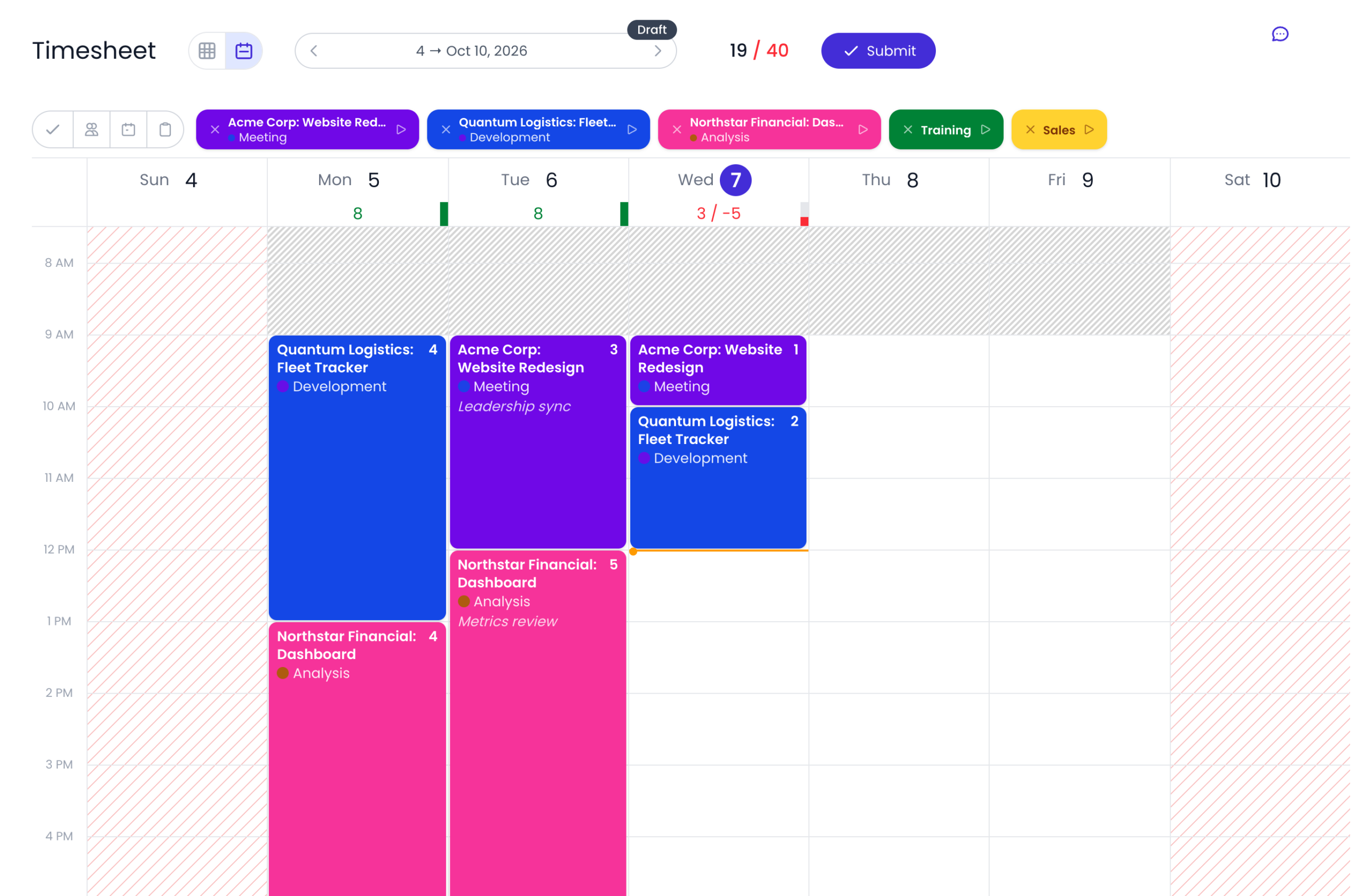
Once you’ve staffed the project, Beebole carries the plan through to each person’s timesheet. Planned work appears as suggested time entries with a Planned badge, so your team confirms their week instead of typing it. Each person accepts, edits, or dismisses each suggestion, and accepted entries go through the same approval workflow as any other time entry. Suggestions stay private to the person until they accept them.
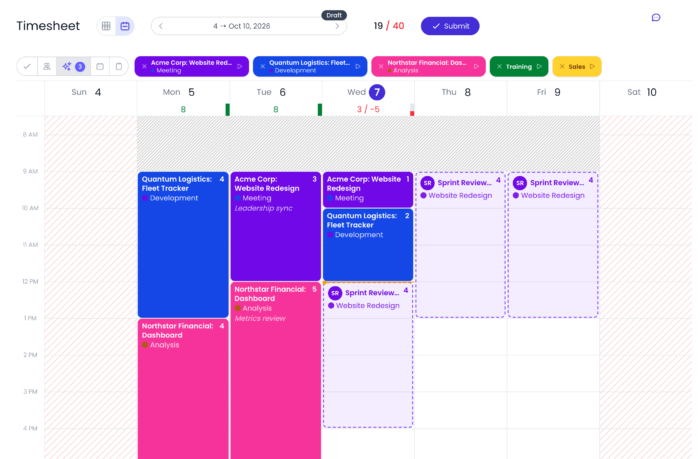
Teams that work to plan can go one step further: the optional Auto Timesheet from planning setting fills the timesheet automatically for anyone who did what was planned.
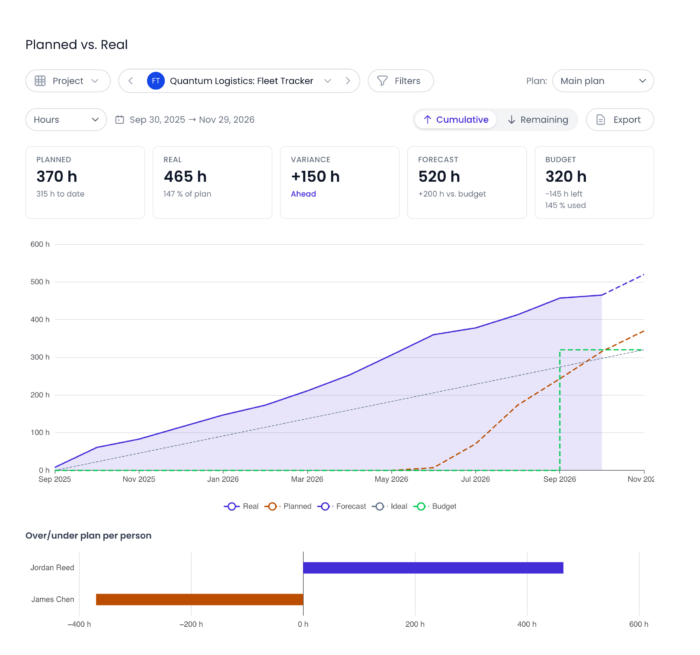
3. Compare plan and reality with the Planned vs. Real report
As your team logs time, the Planned vs. Real report puts planned effort side by side with actual timesheet data. You can read it in hours, days, billing, cost, or margin, and switch between a cumulative and a remaining burn view with an ideal line. A forecast carried forward from today’s actuals and a pace headline (behind, on track, or ahead) show where the project is heading while there’s still time to adjust.
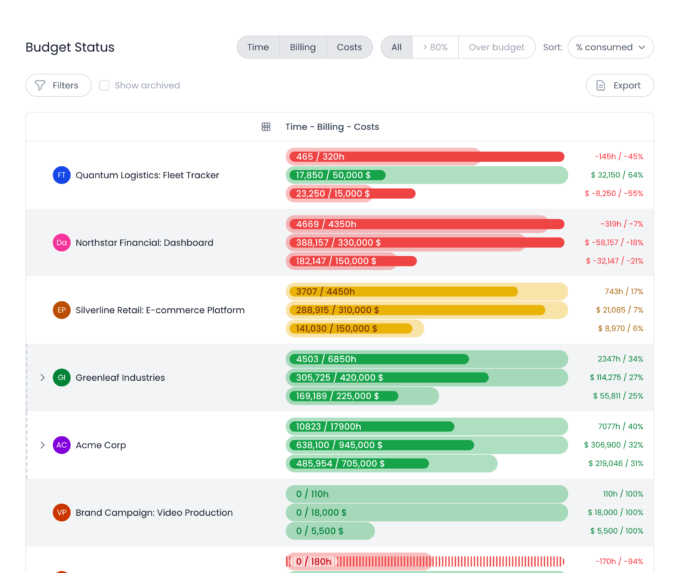
4. Track project costs against budget with the Budget status report
The Budget Status report puts each project’s time, billing, and costs against its budget, using the same timesheet entries your team confirmed in step two. Progress bars show how much of each budget the project has used, and sub-project budgets roll up into their parent. A burn-rate forecast warns you when a project is on track to go over budget, and drill-down detail sheets show the figures behind each bar.
Everything else that’s new in Beebole
We’ve reimagined the entire tool. Here’s a full breakdown by area.
Time tracking & timesheets
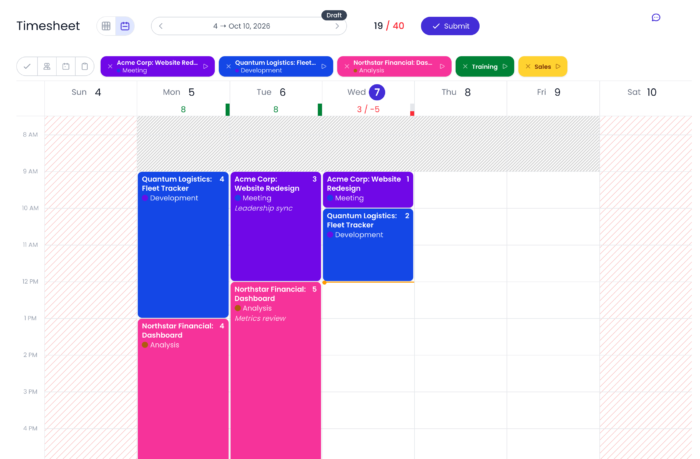
| Period-based timesheets | Submit timesheets on your own terms — whether that’s a week, a fortnight, or any custom period. Once submitted, the entire period is locked, so there’s no risk of accidental edits after the fact. |
| New time entry modes | In addition to hours and days, employees can log time as a percentage of the day — an addition that fits how consulting and professional services teams bill clients by day or partial day. |
| Work-from-home & billability flags | Tag entries as remote or non-billable directly. Custom fields can be added to time entries to capture any numerical or contextual data your workflow requires. |
| Timesheet scoring | The old ‘on-time submit’ flag has been replaced with a timesheet score that grades submission habits — late entries, rejections, and patterns over time — giving managers real visibility into timesheet adherence. |
| Auto-submit | Timesheets can be configured to auto-submit after a set number of days, reducing admin chasing and keeping data current. |
| Admin editor permissions | Administrators can directly correct mistakes on submitted or approved timesheets — no more rejecting and re-routing just to fix a typo. |
Approval workflows
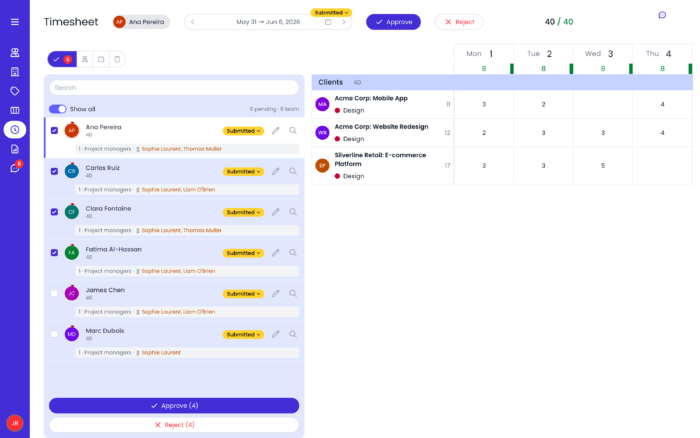
| Multi-stage approvals | Build fully customizable approval chains with sequential stages — project manager, then team lead, then finance — in any order you define. |
| Quorum settings | Define whether a stage requires all approvers to sign off, or just one of them. Flexible enough for any org structure. |
| Approve by email | Managers can approve or reject timesheets directly from their inbox — no login required. |
Planning & task management
| Resource planning | An entirely new and integrated resource planning feature for more accurate financial and capacity planning. Planned tasks and hours can flow directly into your employees’ timesheets. |
| Kanban & Gantt views | Visualize work in progress with a Kanban board, or track resource allocation and FTE occupancy across time with a Gantt chart. |
| Task details | Task dependencies, configurable statuses, recurring tasks, and effort tracking against estimates are all supported natively. |
| Budgeted cost visibility | A budget status report that includes planned time to give you real-time insight into project performance |
Project & org structure
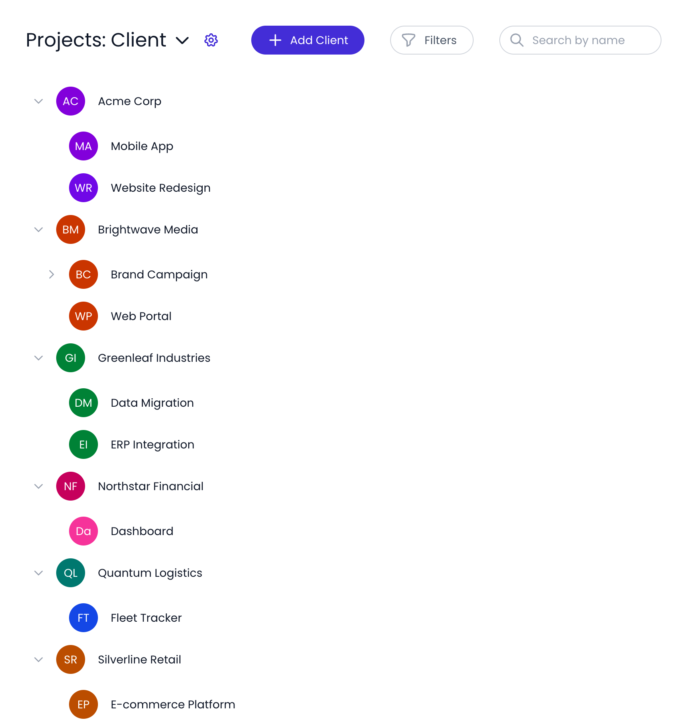
| Unlimited hierarchy | Build unlimited project hierarchies — customer > project > sub-project > task — and add parallel structures (like physical location) alongside them. |
| Advanced tagging | Organize people, projects, and tasks into any grouping, such as departments, teams, locations, or something entirely custom. Apply unlimited tags for more granular reporting and configurations. |
| Admin assist | Support admins can sign in as any user to see exactly what they see and troubleshoot issues in seconds. |
Absence & expense management
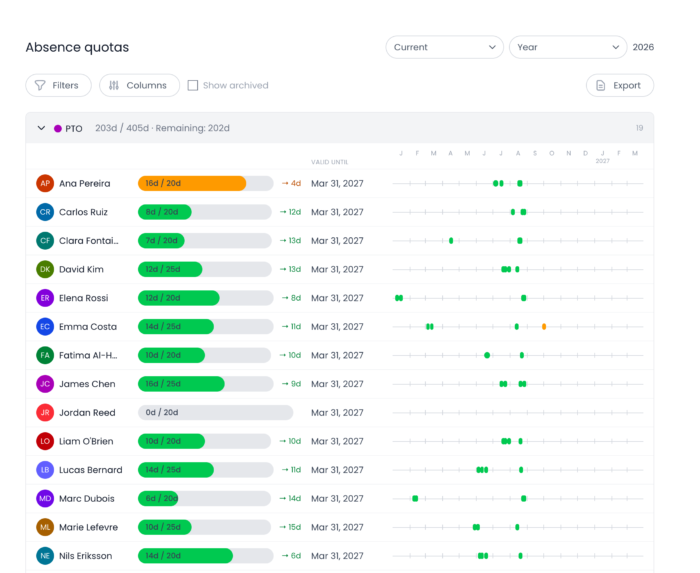
| Absence upgrades | Built-in integration that automatically fetches public bank holidays for global regions. |
| Expense tracking | Log expenses directly against project budgets, with markup percentage settings for client rebilling. Straightforward and fully integrated into the same system. |
Reporting, communication & UI
| Saved reports & charts | Organize saved reports into folders. Every report can be viewed simultaneously as a data table and a fully customizable chart. |
| Journal feed | A threaded activity feed with rich-text editing, file attachments, and @mentions on any entity, such as tasks, projects, or people. |
| Global undo/redo | Undo and redo actions across the entire app. Project configurations and attributes can also be duplicated or copied and pasted to save setup time. |
| Passwordless login | Passkeys and one-time email verification codes are now supported — faster, more secure, and no password manager required. |
What this means if you’re already a Beebole customer
Your data isn’t going anywhere, and we’ve built the new version to move forward with everything you’ve already configured, including projects, people, and workflows. The new version of Beebole is a completely separate tool, and accounts on both platforms can exist simultaneously. Therefore, we encourage you to create an account so that you can start playing with the new features and envision how it can be structured to your organization’s needs. Once you’re ready to migrate your data, get in touch with our support team so they can provide the next steps.
See it for yourself
We’ve been in the project time tracking business for 18 years, and we’ve seen firsthand that businesses need a flexible time tracking and resource planning tool that could adapt to their exact needs. The result is the first version of Beebole where resource planning and financial tracking run in the same system
Whether you’re evaluating Beebole for the first time or you’ve been a customer for years, we’d love to show you what’s new.
Project time tracking, cost control, & resource planning all in one place.
Book a live demo and see what we built — together.

Katie is a digital marketer who researches and writes about project management, leadership, and best practices in business operations. She's on a mission to spread the word about the value of accurate and easy project time tracking. Through her interviews, research, and articles, Katie hopes to help professionals on their journey to a happier, more efficient work day.
Related posts
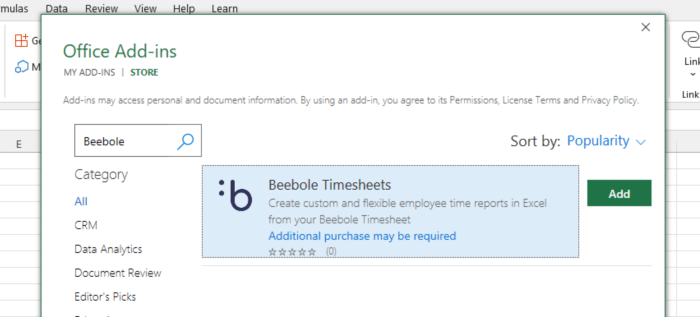
How to install & use the Beebole add-in for Excel: Power up your spreadsheets with time tracking data
The Beebole Microsoft Excel add-in has arrived! With this new tool, you can connect spreadsheets directly to your Beebole account. That makes it easier than ever to analyze and work with your time tracking data. Let’s learn how to set up the Beebole add-In in this tutorial, as well as how to use it. At […]

Google spreadsheet timesheet: An add-on to create incredible employee time reports
Our Google spreadsheet timesheet add-on is perfect if you want to create more powerful employee time reports. Why? Real time business intelligence is fundamental for any organization, whether monitoring its financial status or employee productivity. Frequent, reliable reports offer short-term insights that can lead to long-term savings and growth. To help with this, Google Sheets […]

Tips for better business intelligence reports on Beebole
You may already know that Beebole offers the most flexible, customizable timesheet reports of any employee time tracking software. Create configurable tables, charts, and graphs on employee hours, overtime, projects, budgets, profit margins, costs, and much more. Build and save as many time tracking reports as you need and create a personalized KPI dashboard. Your […]