

Table of Contents
Like our content?
Prefer us on Google.
Add as preferred Prefer us on Google.
source on Google
Want Better Project Time and Cost Insights?
Save 20% per month
20+ integrations
Permissions and customization



TL;DR: What you’ll learn
Payroll variance measures the gap between what you expected to pay employees and what you actually paid — left untracked, it quietly erodes project profitability and makes job costing unreliable.
Here’s what this article covers:
- What payroll variance is: The definition, and why hourly and salaried employees are affected differently
- Why it matters: The concrete business benefits of tracking it, from accurate job costing to compliance with government contract requirements
- How to calculate it: The formula (Actual − Expected Payroll Cost), walked through with three real-world examples: minimum wage increases, overtime after a departure, and benefit cost changes after marriage
- How to report it: What a payroll variance report should include, who uses it (finance, HR, business owners), and the most common questions managers ask
- How Beebole fits in: Using timesheet reports, billing and cost rates, and real-time budget tracking to catch cost variance without building a manual spreadsheet
What is a payroll variance?
Payroll variance is the difference between what your company expected to pay its employees and what it actually paid them, because of things like overtime, vacation, sick days, and pay raises. It helps finance and HR managers figure out if budgets are being met and if everyone is getting paid the right amount.
Payroll variance reports can be a way to keep track of all the money distributed to employees to ensure they are being treated fairly.
It can also be used on project reports. For salaried employees, you can use a standard cost rate; for actual costs, you can use payroll variance calculations or effective cost rates to report to your general ledger.
Payroll variance mostly affects salaried workers. Hourly workers are paid for the hours they log, so the cost charged to their jobs matches their pay, apart from rounding differences that usually come to less than $1.00. Salaried employees always get paid the same amount, however many hours they work and whether they’re paid internally or via outsourced payroll, so the cost charged to jobs at a standard rate rarely matches what they’re actually paid.
Why is payroll variance important to make smarter business decisions?
You must manage payroll variance if you want accurate cost information for jobs.
Payroll variance is crucial to comprehend and control business data because it offers the following benefits:
- Access to current job cost information
- Fair and consistent job pricing
- Job costs that are simple to reconcile to direct costs in the general ledger
- The ability to best evaluate how to use salaried employees most effectively
- For businesses using monthly or semimonthly payroll cycles, a variable number of hours across pay periods without much additional work
- Compliance with requirements for government contracts.
How do you calculate payroll variance?
Calculating payroll variance involves comparing the effective payroll costs to their standard costs. To be more specific, you can figure out a payroll variance by taking the difference between the expected and actual payroll expenses.
What is the formula for payroll variance?
Actual Payroll Cost – Expected Payroll Cost = Payroll Variance
For instance, an employee may work more overtime than anticipated. The expected (standard) payroll cost for this employee was $10,000, but the actual (effective) payroll cost ended up being $11,000. You would calculate their payroll variance as follows:
11,000 – 10,000 = 1,000
Examples of payroll variance
Example #1:
Many states have gone above and beyond the federal minimum wage to raise wages for their workers in response to the growing disparity between high- and low-wage earners. This has led to a wave of minimum wage increases across the country, giving millions of workers a much-needed income boost and making it easier for them to get by.
The new higher minimum wages are a big step forward in the fight against poverty and inequality. Still, they also bring some problems as businesses adjust to paying their staff more.
For this example, let’s say your business has employees who work at a $13.00/hour rate. Labor laws in your state have made the minimum wage now $15.00/hour. Those changes go into effect this week, so their expected pay will be affected.
How to use the payroll variance formula to determine how their pay has been affected:
$15.00/hour – $13.00/hour = $2.00/hour payroll variance
Because of the change in labor laws, these employees have experienced a $2.00/hour payroll variance. Their salary has permanently increased, and their expected payroll can be increased in the future to accommodate this.
Example #2:
An employee’s unexpected departure can significantly impact how much overtime their coworkers are expected to work. With one fewer person on the team, more tasks may be left undone, increasing the workload and making it more stressful.
This may put additional strain on those who remain in the workforce, requiring them to work longer hours to complete all tasks. Also, it can be hard to find a good replacement as quickly as is needed, so other employees may have to fill the role until a good one is found temporarily. This could result in them having to work overtime.
In this example, a team in your company has suddenly experienced a critical coworker quitting. As your management team scrambles to find a suitable replacement, each team member works about 5 hours of overtime per week. Each team member gets paid $25.00/hour, and your company offers double-time pay for overtime hours.
Before their coworker quit, each team member made $1,000.00/week, but now they are making $1,250.00/week. Their pay has been affected unpredictably.
We can use the payroll variance formula to determine how their pay has been affected:
$1250.00/week – $1000.00/week = $250.00/week payroll variance
As a result of their coworker leaving the company, each of these team members’ salaries has undergone a payroll variance of $250.00/week. Since this is only a short-term change, the expected pay for these workers shouldn’t be adjusted permanently.
Example #3:
When an employee marries, their benefits can start to cost more. Many employers price health insurance by coverage level, so an employee who adds a spouse to their plan moves from individual coverage to employee-plus-spouse coverage and pays a higher premium.
For this example, one of your employees has gotten married and added their spouse to their health plan. Per company policy, the higher premium is automatically deducted from their paycheck. Before their marriage, this employee took home $3,800.00 biweekly, but now they will be making $3,650.00.
The payroll variance formula can be used to determine how their pay has been affected.
Let’s use the payroll variance formula to determine how their pay has been affected:
$3,650.00 biweekly – $3,800.00 biweekly = -$150.00 biweekly payroll variance
Because this employee’s benefit premium went up, their biweekly pay has experienced a -$150.00 biweekly payroll variance. This change will most likely be in place for the long term, so their expected payroll should be updated accordingly.
How do you report payroll variance?
You can report payroll variance in a variety of ways. The most common method is to create a spreadsheet that includes employee wages and total hours worked. Once this information has been compiled, you can easily identify discrepancies between expected and actual wages. Additionally, the variance report can audit payroll data for accuracy and calculate penalties or other charges when necessary. Management teams can use the data from these reports to take further action.
Rather than rebuilding this spreadsheet every period, a tool like Beebole can generate the comparison directly from tracked time. Custom time reports can be grouped by person, project, or period and include Billing, Cost, and Margin columns, so the gap between expected and actual cost is visible without manual reconciliation. Overtime columns (daily, per period, and as a running balance) measure each person’s logged hours against their work schedule, and paid time off counts in people costs, so two common causes of payroll variance show up in the same report. The Budget Status report goes further. It compares the time, cost, and billing logged on each project with its budget, and its > 80% and Over budget filters pick out the projects heading past their limit, so a variance shows up while there’s still time to act.

Payroll differences should be reported regularly to ensure that the effective costs of payroll are the same as what is standard. To report a payroll variance, you need to include the difference between actual and expected costs.
Payroll variances are reported to various individuals, including financial managers, business owners, and human resources departments. Tracking payroll variances over time is essential to find problems before they get too expensive.
For organizations managing complex projects, payroll variance isn’t just an HR metric. It’s a deciding factor in project profitability. Rancho Biosciences tracks more than a hundred active projects in Beebole.
With Beebole, they:
🚀 Compare the hours worked on each project with a budget set from its purchase order
🚀 See the status of every active project at a glance
🚀 Feed project, cost, rate, and budget data into their own burndown reports through the API
🚀 Give their accounting team the data it invoices from
The logistics of payroll variance: How to use payroll variance reports to improve your bottom line
What does variance mean on a timesheet?
When an employee’s timesheet shows a different amount of time worked than expected, this is a form of payroll variance. This can be due to employees forgetting to clock in or out, taking longer breaks than allowed, or working overtime without recording it on their timesheets. Employee hours can also be affected by things outside the company, such as economic conditions or changes in labor laws or rules.
How can I get a variance report from payroll?
You can get a variance report from payroll by creating a spreadsheet with all employee earnings and total hours worked. If you are using an automated payroll system, the system should have a built-in report feature that allows you to generate the report. You can also figure out the difference for each employee manually by subtracting their actual earnings from what they were expected to make. This method is often used to make sure payroll calculations are correct when doing an audit.
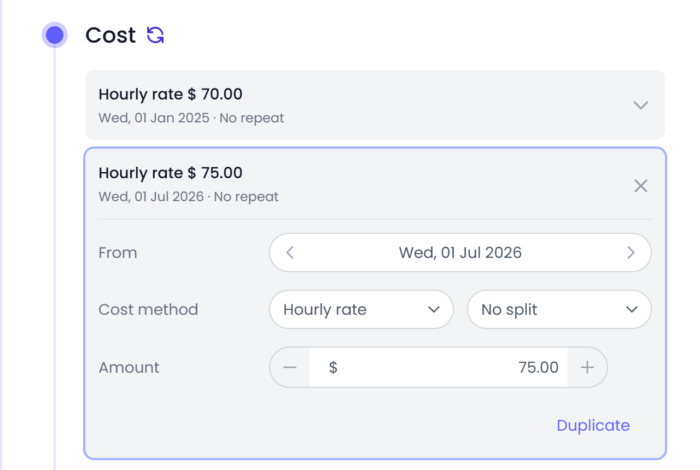
On the time-and-cost side, Beebole builds this report from tracked time. You set a cost rate per person, project, or tag, and each rate starts on a date you choose. When a raise like the one in Example #1 takes effect, you add the new rate from that day, and earlier entries keep the old cost. Reports then compare the actual cost of logged time with each project’s budget, so nobody has to pull the comparison together by hand.
What should be included in a payroll variance report?
The difference between the expected and actual costs should be listed in the payroll variance report, along with an explanation of why there is a difference. The report should also list any changes that have happened over time so that problems can be found before they get too expensive to fix.
Also, it helps to give any information about relevant trends and activities that could help explain the difference. For example, if a company has had more employees than usual, there may be more payroll costs associated with their employment, which could help explain a higher variance amount.
What does payroll variance reporting mean?
Payroll variance reporting is the process of keeping track of and writing down the differences between what was expected and what was actually spent on payroll. This helps find potential problems. This process is critical because it lets management know about possible problems before they become too expensive.
Who exactly uses payroll variance reports?
Payroll variance reports are used by a wide range of people, including financial managers, business owners, and human resource departments.
Financial managers:
Financial managers use the data found on payroll variance reports to monitor how well a company’s payroll system works and find any problems that need to be fixed.
Business owners:
Business owners use this information from payroll variance reports to judge how well a company plans its budget and utilizes its resources.
HR departments:
The human resources department uses payroll variance reports to ensure that employees are paid fairly for their work.
By keeping track of how payroll costs change over time, companies can figure out what might need to be changed or improved to ensure their payroll costs are correct. Management teams can then use the analyzed data from payroll variance reports to make well-informed changes or adjustments. Changes such as increasing staff, offering salaries to hourly employees, or changing employee benefits can help management run the business more cost-effectively.
How do you factor in a payroll variance?
Before you can resolve a payroll discrepancy, you must first determine why it occurred. It could be because of wrong employee pay rates, mistakes in keeping track of time, overtime pay, or other things. Once you know what happened, you can look at the payroll data to determine how much of the difference can be attributed to each factor.
Payroll variance reports help employers understand labor costs and plan for future expenses. Furthermore, these reports can highlight areas where the company may need to take action to address any discrepancies or inefficiencies in its payroll systems.
Payroll variance: Frequently asked questions
1. Is payroll variance reported as a number or a percentage?
Payroll variance is reported as the difference between expected and actual wages.
The variance can be depicted as a number:
For example, an employee is expected to earn $15/hour, but their actual wages come out to be $14.50/hour. This is how it would be depicted in the payroll variance equation.
$14.50/hour – $15.00/hour = -$0.50/hour (The payroll variance would be reported as -$0.50/hour.)
Actual Payroll Cost – Expected Payroll Cost = Payroll Variance
The variance can also be depicted as a percentage:
Use the variance from the last example to find the payroll variance as a percentage.
-$0.50/hour ÷ $15.00/hour = -0.0333 × 100 = -3.33% (It would be reported as -3.33%)
(Payroll Variance ÷ Expected Payroll Cost) × 100 = Payroll Variance in %
2. Why is indirect labor reduced for payroll variance?
For payroll variance, indirect labor is less important because it doesn’t involve things like making or selling. Indirect labor is performed by people who maintain the building, handle office work, and perform other tasks that don’t directly produce goods or services. Reducing indirect labor helps companies control costs and only pay employees for revenue-related activities.
3. What causes payroll variance?
Several internal and external factors can affect the difference in payroll at a company.
On the employee level, things like changes in wage rates, unplanned absences, overtime pay, using paid vacation or sick time, and hazard or incentive pay can all cause payroll variances. Additionally, management can impact payroll variance through miscalculations, employee turnover, giving out bonuses, and changing expenses for employee benefits. Lastly, payroll variance can be caused by things outside of the company, such as inflation or changes in labor laws.
Some of these causes show up before payday. If your team plans its work ahead, comparing planned vs. actual hours per person shows who is working more or less than planned. In Beebole, the planned vs. real report makes this comparison in hours or cost, with an over or under figure for each person.
4. How is a salary variance report different from a payroll variance report?
A salary variance report and a payroll variance report are different in the following ways:
Salary variance report:
- Shows the difference between employee salaries paid out to them in various months.
- Used to identify mistakes in salary calculations.
- Contains details of all deduction and earning components for every employee for a given month.
- Highlights the difference between amounts in each component.
Payroll variance report:
- A monthly analysis tool used by finance and HR managers to review potential significant variances in actual employee compensation compared to the budget.
- Groups employees into two main categories and presents the actual salaries with a comparison to the budget and displays the difference.
- The two employee categories are classified salaries with subsections for permanent and temporary positions, and unclassified salaries with subsections for permanent and temporary positions.
- The purpose of a budget-to-actual payroll variance report is to easily detect major differences between budgeted and actual compensation.
In summary, the key difference lies in the scope and level of detail. A salary variance report concentrates on individual salary discrepancies, while a payroll variance report provides a more comprehensive view of all payroll-related expenses.
How to use Beebole to improve payroll variance analysis
One location for all the reports you need
With a tool like Beebole, you can create any report you need across time, expense, and task records, and filter by person, project, task, tag, date, and more. Each report you build can be saved as a template and sorted into folders to stay as organized as possible.

Centralizing information means you can find what you need without hunting across multiple systems. This saves time on administration and payroll, and frees you up to manage projects and your team more effectively.
You control your time tracking data
You can share reports with clients and coworkers by downloading them as CSV, Excel, or PDF files. The Microsoft Excel add-in and the Google Sheets add-on link a spreadsheet to a saved Beebole report and refresh it on demand or each time the file opens, so the figures you work from stay current without re-exporting.
Your company can keep the software it already uses. Beebole connects natively with QuickBooks and Xero for invoicing, and with BambooHR for people and approved time off. For a payroll or ERP system, its open API and webhooks pass time and cost data across. Beebole doesn’t run payroll itself; it supplies the hours and costs your payroll tool works from.
Payroll variance figures are only as reliable as the hours behind them. When a manager reviews a submitted timesheet, Beebole flags time on a non-working day, more time than scheduled, and time outside working hours before they approve it. A report filtered on the Approved status then counts only approved timesheets. Once payroll for a month is done, a lock date freezes that month’s time records for everyone, admins included, so the figures can’t change afterward.
Ease of access
In Beebole, you’ll find all reports organized into folders in the Reports page. Each one can be viewed as a table, chart, or matrix. You can run reports from any folder, filter and group them on the fly, and share a folder with specific people or with a tag, such as your finance team. Beebole works on desktop and on phones, as an app installed from the browser, so reporting isn’t tied to one device.

I can’t say enough about how easy and effective Beebole is for tracking time on projects. It is incredibly powerful yet simple to use. No one wants a “solution” that takes more time than the time-saving it is supposed to provide. For tracking projects and different scopes within a project, this is the easiest and most efficient use of my time. It gives us accurate and detailed information to include with client billing.
Beebole features
Employee time reports
Beebole transforms the way you examine your timesheet reports, tracking how much time employees spend working and turning it into detailed, dynamic reports. You can configure multidimensional reports and choose from 11 chart types, then export and send them to any team member. Beebole’s Excel add-in and Google Sheets add-on also keep that data up to date in your favorite spreadsheet tool.

Billable hours
Billing options In Beebole are created to accommodate any situation your company may face, so you can set billing rates by organization, tag, project, or person and choose how each one is charged.
As a manager, we use Beebole to capture and report time for over 150 projects. We monitor billable and non-billable project time logged by a team member. We use reports to evaluate how to increase our billable project time. We also use Beebole to view who is under- and over- utilized throughout the year. Beebole reporting has become an integral part of resource discussions with upper management. Overall, Beebole is easy to use by both an individual team member and those needing to extract data for management reports.
Billing methods offered:
Every billing rate uses one of four methods:
- Hourly rate: A fixed amount per hour worked
- Daily rate: A fixed amount per day worked
- Fixed fee: A flat amount regardless of time spent. It can also repeat automatically (weekly, monthly, or yearly), making it a good fit for a recurring retainer.
- Non-billable: No billing amount is calculated for the covered time. Leaving billing blank isn’t the same as marking something non-billable. A blank setting can still inherit a rate from elsewhere (like a company-wide default), while “Non-billable” always results in $0 regardless of setup
Each rate can be set at four levels — organization (a company-wide default), tag (a default for a department or client group), project (including its subprojects), or person (e.g., a contractor’s specific rate) — and rates cascade down from broader levels unless a more specific level overrides them.

A flexible time tracking solution: What users say about Beebole
Beebole’s project time tracking software records your team’s time on clients, projects, and tasks, and separates billable from non-billable hours. Every plan, including Free, comes with live human support.
Beebole’s Google Sheets integration is the winner for us. I love that you can easily integrate with Sheets; it makes my reporting an absolute breeze. Two clicks and the latest data is imported and ready for interrogation; it makes Beebole a really powerful tool.
I generate several reports to look at timesheet data and easily export them to Excel.
Closing thoughts on payroll variance and its importance
The importance of knowing whether budgets are being met and if everyone is being paid the right amount is irrefutable. A well-done payroll variance report provides key insight into current job cost conformation, and allows leaders to make informed, smart decisions. That’s exactly why payroll variance reporting simply can’t be skipped or done poorly. Whether you’re looking to improve your project reporting or simply your general payroll process and reporting, we hope this article has pointed you in the right direction.
Let us know what your biggest struggle is when it comes to payroll variance reporting in the comments below. We’d love to hear from you.
—
Photo by StellrWeb on Unsplash
Catch Payroll Variance Before The Month Closes
The experts who have written or contributed to this article are independent from Beebole, and their contribution doesn't serve as endorsement for our company/tool or their past/present organizations, employers, or associates.

Benjamin Wann, CMA, CSCA, MBA, PMP, & CPA, is a manufacturing product cost expert who is purpose-driven and passionate about making a difference by sharing valuable, refreshing, and practical content to help organizations improve their effectiveness.
Related posts

3 things to know when managing multiple billing rates on projects
The challenge of managing projects with multiple billing rates This guide aims to provide insight into the dynamic world of project billing, underscoring the necessity for precision, consistency, and foresight in managing multiple billing rates. As a Beebole implementation consultant, I’ve seen my fair share of scenarios filled with these challenges. So please follow along […]
Project cost control made easy: Mastering budget-to-actual variance analysis
To deliver a product or service within a specified time and budget, you have to juggle a variety of activities, responsibilities, and stakeholders. Estimating the project’s cost and keeping tabs on actual spending are two crucial aspects for project managers. Budget-to-actual variance analysis is the comparison of the budgeted and the actual cost of the […]

How to calculate project profitability using time tracking data: Everything you need to know [Excel tutorial]
If you bill clients based on the time you spend, here’s a pop quiz: which projects make the most money? Or even more importantly: which projects aren’t profitable? If you don’t know the answer to these questions, it’s time to start thinking about project profitability, a measurement of revenue billed versus time and cost expended. […]