

The audit trail is not available on the Free plan. It is part of the Essential and Advanced plans and of the free trial. If you don’t see it, check your subscription.
Where to find the audit trail Admin only
Each change appears in the Journal of the item it touched, next to the messages posted on that item. The Journal in the sidebar does not list these changes.1
Open the item
Open the person, project, task, tag, role, work schedule, time off type, expense type, or custom field whose history you want to see. For example, click People in the sidebar, then click the person.
2
Switch to its Journal
Click Show journal, the button at the top right of the item’s panel. Click it again (Show attributes) to return to the item’s settings.
3
Read the changes
Changes are listed newest first, each with who made it and how long ago.
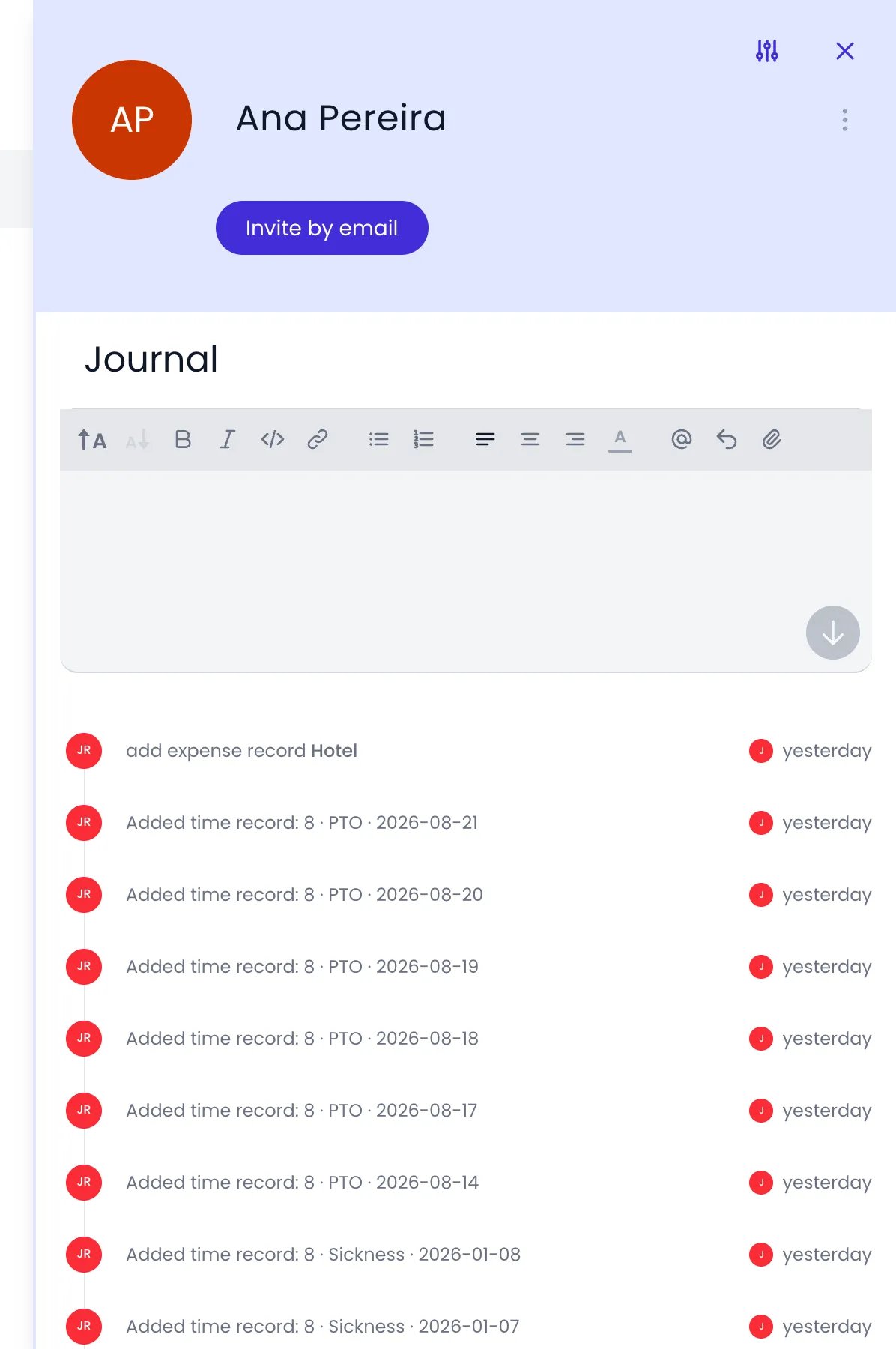
A person's Journal listing the changes made to her records
Only administrators see change entries. Other people who open an item’s Journal see its messages, not its change history.
What each entry shows
Each entry is named after the change it records, so you can read the history without opening anything. When the change involves another item, the entry names it too.
Time entry changes spell out the duration, the project, task, or time off type, and the date of the entry. On an edit, the changed value shows as old → new, for example Edited time record: 2h → 3h30 · Acme Corp, Website Redesign · 2026-10-05. Durations follow your account’s duration format.
Show one kind of change
Click a change entry to show only the changes of the same kind, such as every Tagged with and Untagged from entry on a person. Messages stay visible. Click the entry again to show everything.Changes made while signed in as someone else
When an administrator uses Sign in as… and changes something on another person’s behalf, the entry names the administrator who made the change, not the person they were signed in as. See Sign in as another person.Look further back
The Journal shows the changes of the last 7 days. To look at an earlier week, or to list every change one person made, use one of these:- The Beebole API: the
getAuditTrailsquery returns a 7-day window starting at thestartTimeyou pass, andfromPersonIdlimits it to the changes made by one person. - A connected AI assistant: ask it who changed something in a given week, or for every change a person made. It reads the same audit trail.
Related content
Journal
Post messages, follow team activity, and filter the feed.
Roles & permissions
Control who has admin access to view audit activity.
API queries
Read the audit trail and other account data with the GraphQL API.
Data Exports
Export your organization’s data for reporting and record-keeping.
Frequently asked questions
Does Beebole's audit trail show the previous value of a field?
Does Beebole's audit trail show the previous value of a field?
For time entries, yes: an edited entry shows the changed value as old → new, along with the entry’s duration, project or task, and date. For other items, Beebole names the kind of change, such as Name change or Changed role to, with who made it and when, but does not show the old and new values side by side.
Where do I see audit activity in Beebole?
Where do I see audit activity in Beebole?
In the Journal of the item that changed: open a person, project, task, tag, role, work schedule, time off type, expense type, or custom field and click Show journal. Changes to the account’s settings are in the Account Settings journal. Only administrators see change entries, and the Journal in the sidebar does not list them.
How far back can I see changes in Beebole?
How far back can I see changes in Beebole?
Beebole shows the last 7 days of changes in each item’s Journal. For an earlier week, an administrator can query the audit trail through the Beebole API with
getAuditTrails and a startTime, or ask a connected AI assistant.Does the audit trail record who viewed data, or only changes?
Does the audit trail record who viewed data, or only changes?
Only changes. Beebole’s audit trail records actions that modify data, such as adds, edits, and removals. It does not track who viewed or accessed a record. Changes made by someone who was later archived stay in the audit trail, with their name next to each change.
Is the audit trail available on every plan?
Is the audit trail available on every plan?
No. Beebole’s audit trail is not available on the Free plan. It is included in the Essential and Advanced plans and during the free trial. Review your subscription if it isn’t available.