

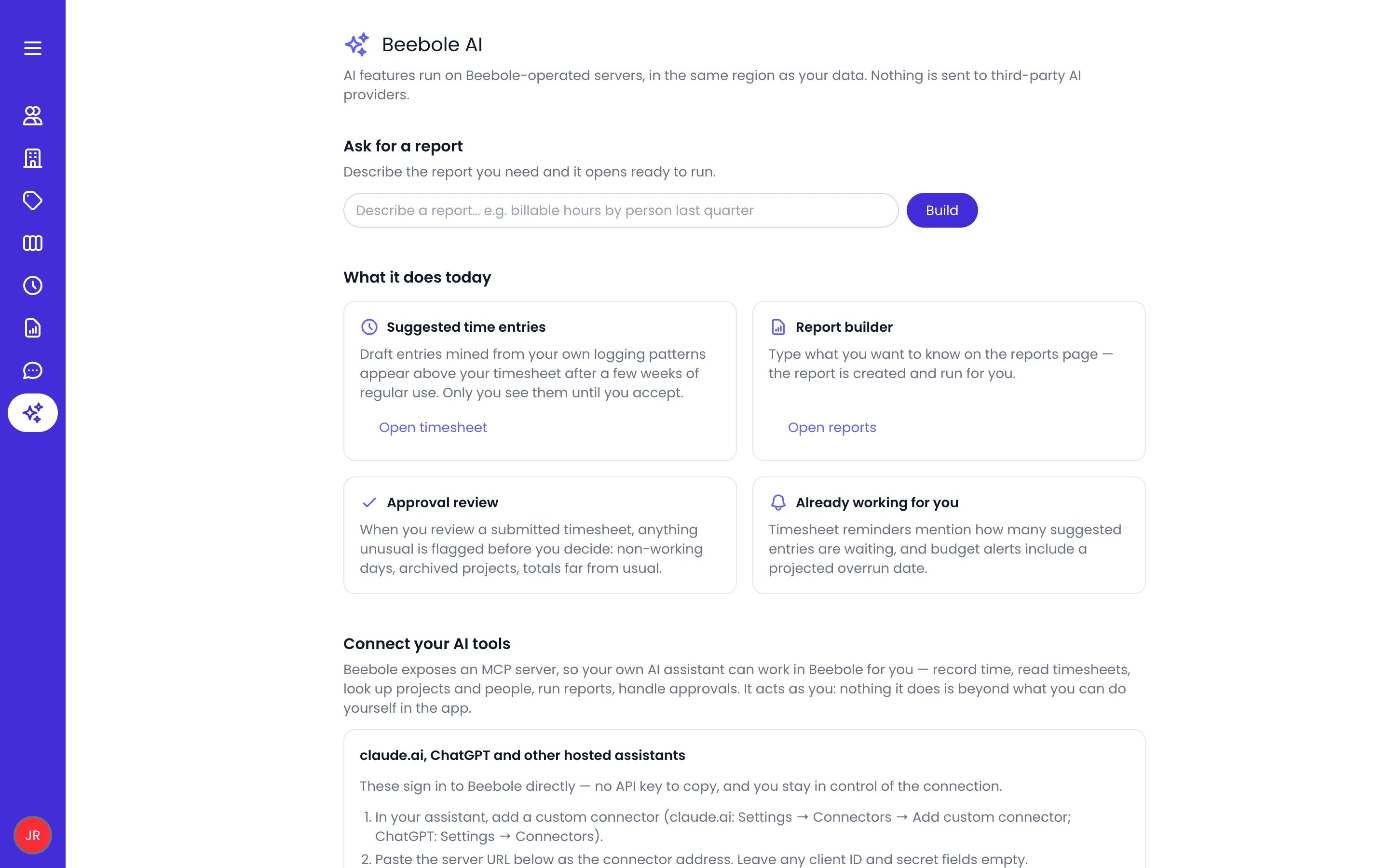
The Assistant page
Beebole AI runs on self-hosted AI models, on Beebole-operated servers in the same region as your data. Nothing is sent to a third-party AI provider.
Suggested time entries
Beebole drafts time entries for you and shows them in the Suggested entries pane next to your timesheet — open it in the grid view with the suggestions button (Suggested entries) in the button cluster at the top left of the timesheet. Each suggestion carries a badge naming its source:
The sources work together on one timeline per day. When two sources describe the same work, the suggestions merge into a single card showing every contributing badge. When they propose different work for the same hours, the higher source keeps the time, in this order: what you logged yourself, then AI assistant, Web, Desktop, Kanban, Planned, and Habit. What you already logged by hand is subtracted, suggestions shrink to fit the room a day still has, and they never land on locked days, public holidays, full-day absences, or already-submitted periods. Planned suggestions rebuild each time you open the timesheet, and habit suggestions refresh daily, so the pane always reflects your current plans.
Each card shows the project or task it is about, with its picture and color rather than a generic icon, so you can tell at a glance what is being proposed.
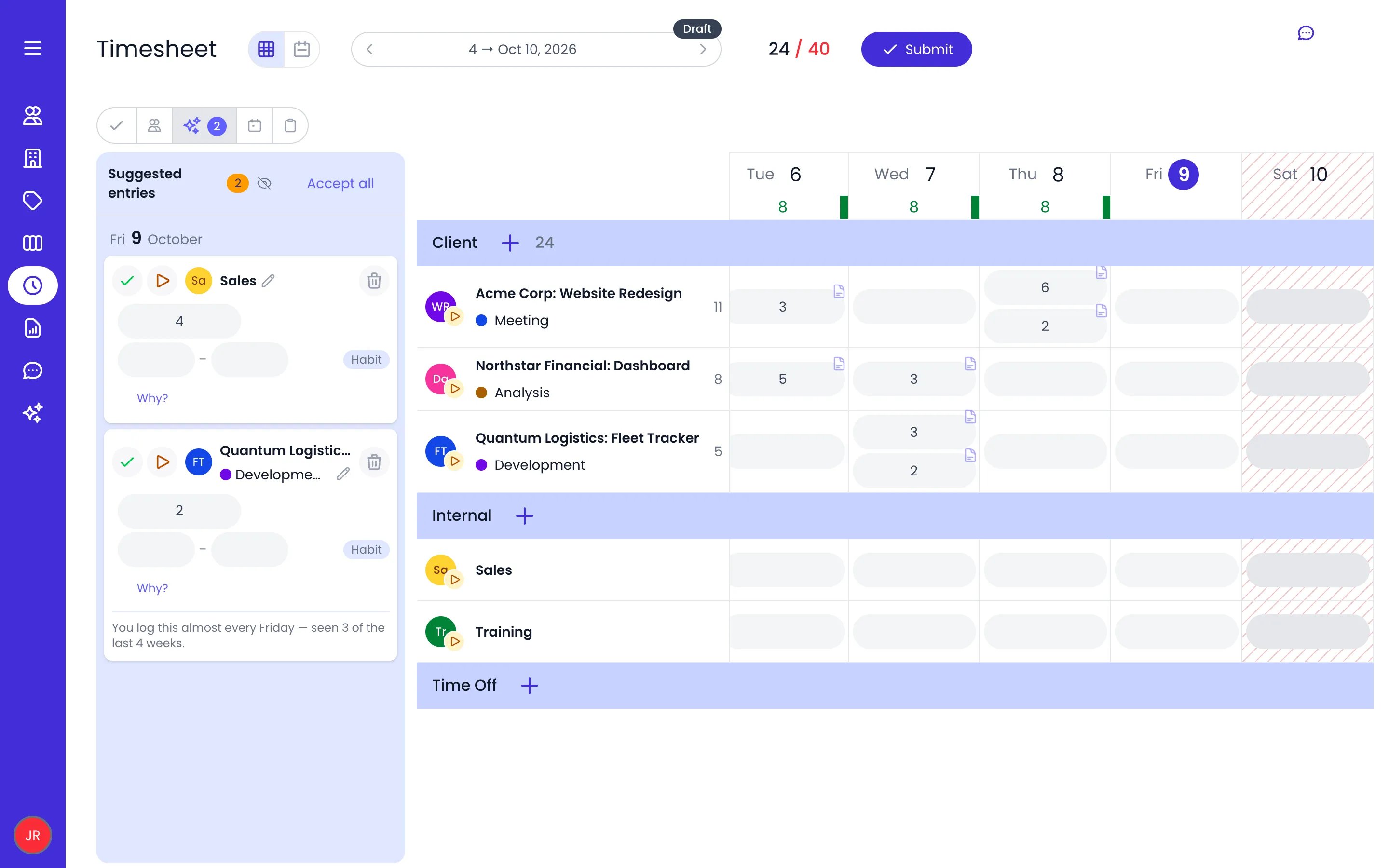
Two Habit suggestions in the Suggested entries pane, the second with Why? open
- Accept it (or Accept all) — the entry lands on your timesheet.
- Dismiss it. If a dismissed suggestion was hiding an overlapping one, the runner-up reappears.
- Start it — the play button on today’s suggestions starts a timer on the suggested project or task. It is available in the pane, on the calendar ghosts, and in the suggestion popup, and what it does depends on how your account records time:
- When start and end times are off, play accepts the suggestion and keeps the timer running on the entry it became, in one gesture.
- When Record start and end times is on, play only starts the timer — the tracked time is the entry, so no separate entry is created. The suggestion shrinks as the tracked time covers it and disappears once it is fully covered. While the timer runs, the button switches to a pause button (Pause timer), and a second click pauses it.
- Click Why? to see the evidence: the applications and sites behind a Desktop or Web suggestion, the planned dates and share of your time behind a Planned one, or how many recent weeks a Habit was seen. Activity details are only readable where they were captured — elsewhere, Beebole tells you the details are only available in the desktop app or browser that tracked the activity.
Suggestions logged on a project
Some suggestions can’t become an entry on their own task:- A task your timesheet does not accept time on, meaning a task in a planning left out of Record time on these plannings in Timesheet and Planning Settings.
- A staffing booking. A booking is planned work, not an activity you log against, so it never carries a loggable task of its own.
Planned work on future days
Planned suggestions also reach beyond today. Whether you can act on them ahead of time follows the same rule as typing a future entry: the Only time off can be recorded in the future restriction in Timesheet and Planning Settings.- When the restriction is active, future-day suggestions appear as read-only forecast cards — a muted, dashed preview of what you are planned to work on — so you can see the shape of your week ahead. A forecast card becomes fully actionable, with accept, edit, and dismiss, once its day arrives.
- When your account allows logging time ahead, a future-day card keeps its controls: accept, edit, or dismiss it like any other. The quick accept and dismiss lines in the entry popup of a task follow the same rule and show that day’s suggestion up to 30 days ahead.
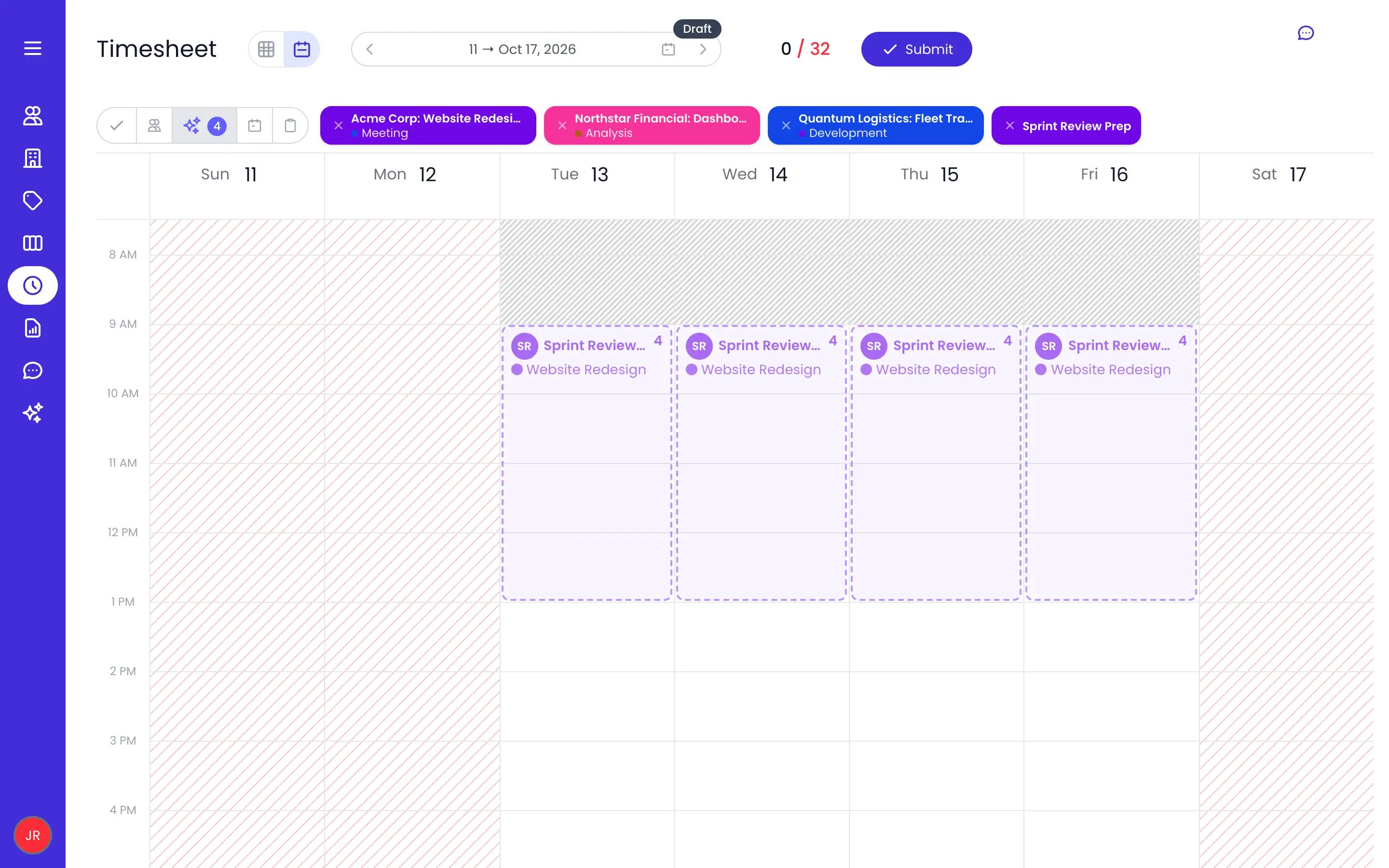
Next week in the calendar view: the planned task as read-only forecast cards
Activity captured by the desktop app is kept only on your computer and deleted after a week. To turn activity into suggestions, Beebole AI classifies what the desktop app cannot match by itself (application names, window titles, and durations) and, from the browser extension, the site addresses, page titles, and durations of the sites you chose, together with the names of the projects and tasks to match them to. Classification runs on Beebole-operated servers in your data region, and nothing about your activity is stored there. Only the resulting suggestions reach your account, and only the ones you accept reach your timesheet.
Report builder
Describe the report you need in plain language and Beebole creates and runs it for you.- On the Assistant page, use Ask for a report — the report opens ready to run.
- On the Reports page, type what you want to know in the report builder.

A request typed in Ask for a report
It speaks your organization’s vocabulary
You do not have to describe your account’s structure — the builder already knows it. It reads the names you gave your project and task categories and each of their levels, along with your custom fields, so a request like “hours by client last month” or “hours per cost center” groups the rows on that level of your hierarchy, or on the values of that custom field. Ask for “people and their Seniority year to date” and each axis becomes a column, in the order you named them. Names you mention are matched against the projects, people, tasks, and tags you are allowed to see; when one cannot be matched, Beebole tells you what it could not find instead of running the wrong report. With a report already open, the input sits under its title and your request changes that report: add a billing column, group by month, or turn the chart into a pie, and everything you did not mention stays as it is. Ask for a new or separate report and Beebole creates one instead. The button reads Build for a new report and Update when you are changing one.When Beebole asks instead of guessing
Some requests cannot be expressed with the options a report has. Rather than return a plausible-looking wrong answer, Beebole replies with one short question. The most common case is grouping by a tag category: tags filter a report but are not a grouping axis, so “hours by department” comes back as a question about how you want the rows grouped.What reaches the model
Only definitions are sent: your question, the structure of the report you have open, and the names of your categories, their levels, and your custom fields. Your time entries, the amounts in them, and the names of your projects, people, and tasks are not part of the request. The model only writes the report definition — every figure is computed by Beebole’s own reporting engine, with your permissions applied, exactly as for a report you build by hand.Approval review
When you review a submitted timesheet, anything unusual is flagged before you decide. The review digest checks the period for:- Time on a non-working day
- More time than scheduled
- Time outside working hours
- Time on an archived project / Time on a task marked done
- Entry right after the lock date
- Task over its planned time
- Period total far from usual
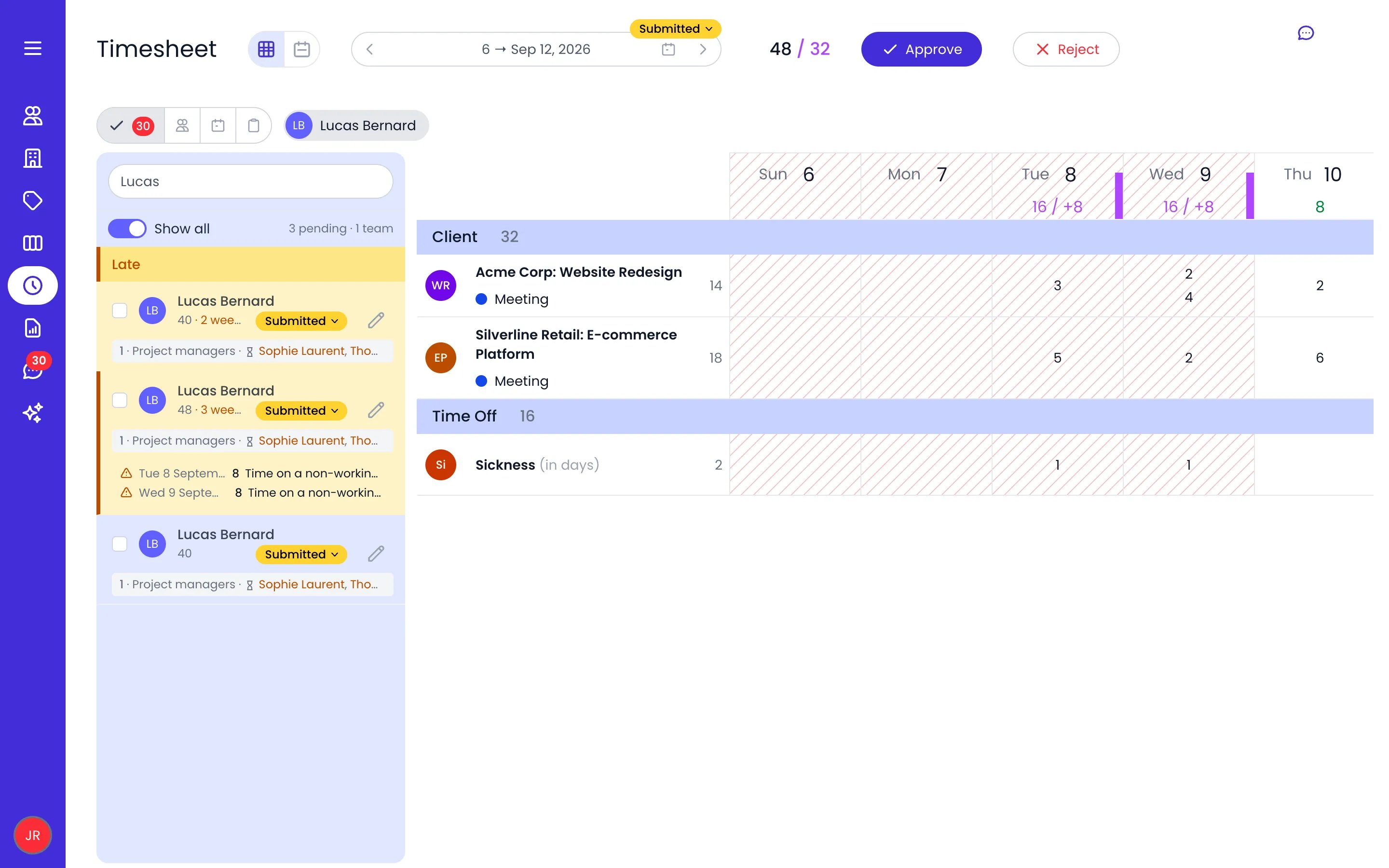
Two days flagged under a submitted week in the Pending pane
Already working for you
Some AI touches need no setup at all: timesheet reminders mention how many suggested entries are waiting, and how many hours they add up to — and when auto-submit is on, they announce the deadline in advance, so you know how long you have to review them.Connect your own AI tools
Beebole also works with the AI assistant you already use. Connect Claude, ChatGPT, or another assistant to your Beebole data — with exactly your permissions — and manage every connection from the Connected apps list. See the Beebole MCP server for setup.Related content
MCP server
Connect Claude, ChatGPT, and other assistants to your Beebole data.
Desktop app
Draft time entries automatically from what you work on.
Browser extension
Turn time on the sites you choose into draft entries.
Timesheets
Where suggested entries appear and get accepted.
Frequently asked questions
Does using Beebole AI send my data to OpenAI, Anthropic, or another AI provider?
Does using Beebole AI send my data to OpenAI, Anthropic, or another AI provider?
No. Beebole AI runs on self-hosted AI models, on Beebole-operated servers in the same region as your data, and nothing is sent to a third-party AI provider.What the model sees is also deliberately small. For the report builder it is only definitions — your question, the structure of the report you have open, and the names of your categories and custom fields — never your time entries, their amounts, or your project, person, and task names.For suggested time entries, the desktop app and the browser extension send the activity to classify (application names and window titles, or site addresses and page titles, with durations) and the names of the projects and tasks to match it to. Classification runs on Beebole-operated servers and nothing about your activity is stored there.Connecting your own assistant through Beebole’s MCP server works the other way around. That assistant reads your Beebole data with your permissions, and only when you set the connection up yourself.
Who can see my suggested time entries?
Who can see my suggested time entries?
Only you. Suggested entries in Beebole are private to you until you accept them — teammates, managers, and admins never see your suggestions or the activity behind them.
Where do time entry suggestions come from?
Where do time entry suggestions come from?
From six sources: an AI assistant you connected through the Beebole MCP server, your own recurring logging patterns, the Beebole desktop app and browser extension if you install them, work planned for you in Planning, and Kanban cards you move to a done column. When sources compete for the same hours, an AI assistant’s suggestion comes first, then the browser extension, the desktop app, Kanban, Planning, and your habits. Each suggestion shows its source badge and a Why? explanation, overlapping suggestions merge into one card, and you decide what to accept or dismiss.
How do I write a report with AI in Beebole?
How do I write a report with AI in Beebole?
Describe what you want to know — on the Assistant page under Ask for a report, or directly on the Reports page. Beebole builds the report and runs it; the result is a normal saved report in a folder named AI that you can refine and reuse. Use the words your organization uses: the builder knows your category names and levels and your custom fields, so “by client” or “per cost center” groups on that level or field. With a report open, the same input changes that report instead of creating a new one.If a request cannot be expressed with the options a report has, Beebole replies with one short question rather than guessing — grouping rows by a tag category is the usual case, since tags filter a report but are not a grouping axis. Answer in the same input and the report is built.
What does the approval review digest check?
What does the approval review digest check?
It flags time on non-working days, overtime beyond the schedule, time outside working hours, entries on archived projects or on tasks marked done, entries right after the lock date, tasks over their planned time, and period totals far from that person’s usual — all before you approve or reject.