
Table of Contents
Like our content?
Prefer us on Google.
Add as preferred Prefer us on Google.
source on Google
Beebole is a key staple of our back office operations.

Project cost tracking software — also called cost control systems or project budgeting tools — is no longer just about time logs. The real challenge is financial clarity: knowing where money is going, predicting where it’s about to go, and reporting it in real time. The best project time tracking software offers powerful project budget management with tools for labor cost monitoring, project financial reporting, and insight into billable hours tracking.
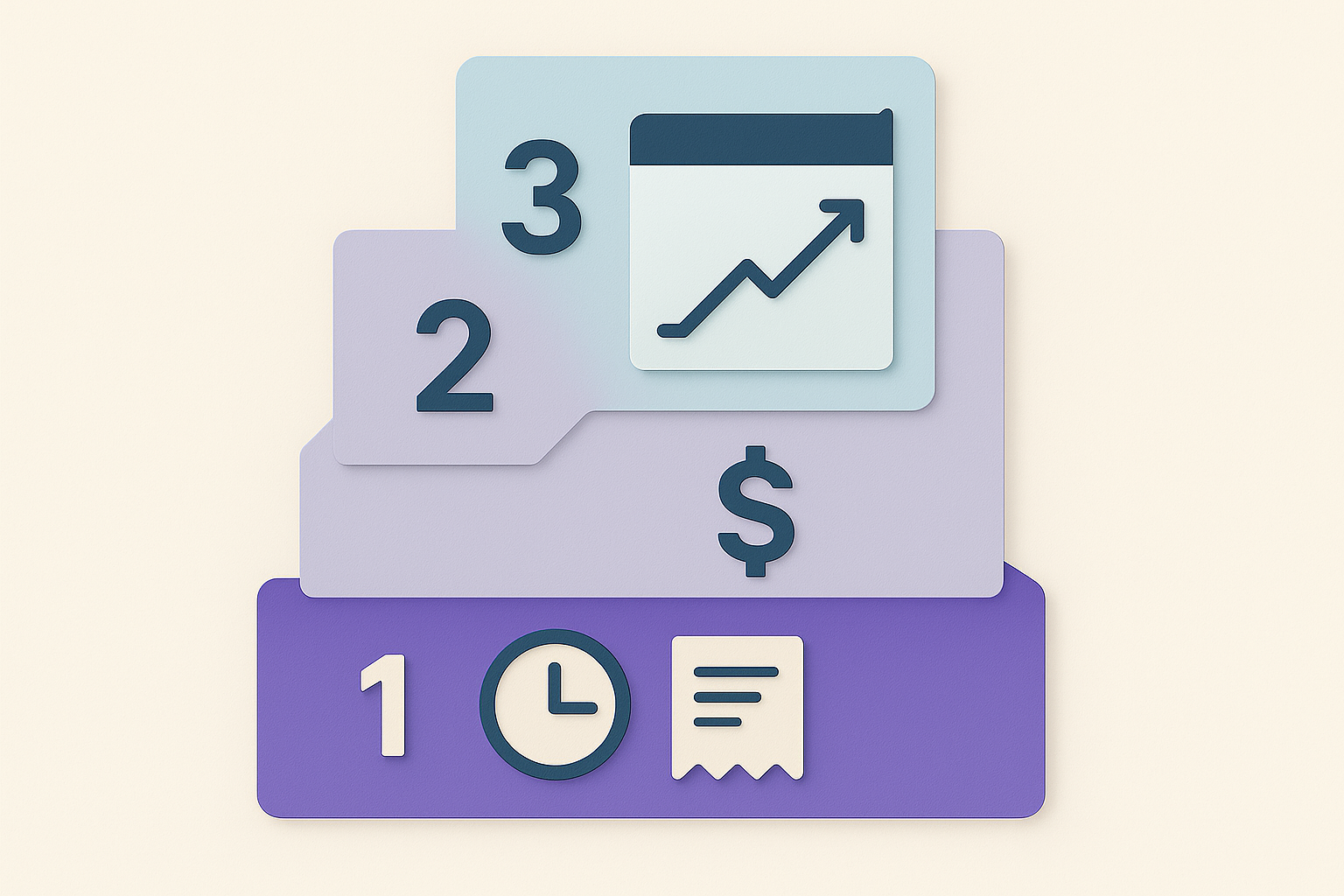
That’s why we’re using what we call the Three Layers of Project Cost Control:
- Cost tracking – baseline logging of hours and expenses
- Budget forecasting – anticipating overruns before they hit
- Real-time reporting + integration – translating raw numbers into financial clarity
As you’ll see, most tools stop at Layer 1. A few dip into Layer 2, and almost none master Layer 3.
This ranking isn’t based on vendor hype. We looked at actual usability, reporting depth, integrations with tools PMs already live in (Google Sheets, Excel, QuickBooks), and what real project managers say on Reddit and PM Stack Exchange, G2, and Capterra.
TL;DR: What you’ll learn
Project cost tracking tools that simply stop at logging hours don’t tell the whole story. The best project cost tracking tools take budget, cost, and time data to catch project budget overruns before they happen, which means real-time reporting is key. Our guide ranks the top 12 project cost tracking tools against a three-layer framework so you can see which ones actually deliver financial clarity. We’ll cover:
- The three layers of cost control: Why logging hours is just the starting point, and what separates basic tracking from real budget forecasting and live reporting.
- How the top 12 tools stack up: Hands-on comparisons of Beebole, Harvest, TMetric, Celoxis, Kantata, Smartsheet, monday.com, Wrike, Zoho Projects, ClickUp, NetSuite OpenAir, and Microsoft Project.
- What real PMs say: Ratings and feedback pulled from G2, Capterra, Reddit, and PM Stack Exchange, not vendor marketing.
- Pricing at every scale: From free tiers for solo users and small teams to enterprise-priced PSA platforms.
- Where Beebole fits in: How its budget forecasting, multi-currency reporting, and live Google Sheets/Excel integrations push cost tracking into full Layer 3 territory
What is project cost tracking (vs budgeting & accounting)?
Project cost tracking = the operational layer of cost management. It covers:
- Capturing time and expenses
- Applying billing/cost rates
- Monitoring labor costs
- Enforcing budgets
- Surfacing variances
- Project financial reporting
ISO 21500/21502 calls it integrated project controls. The AACE (Association for the Advancement of Cost Engineering International) frames it as systematic cost control across the lifecycle. Translation: it’s not just a spreadsheet — it’s a process with real financial visibility.
In practice, effective project budget management combines three operational areas: billable hours tracking (capturing who worked on what), labor cost monitoring (applying rates and calculating true project costs), and project financial reporting (surfacing budget variance and profitability insights). The best tools in 2026 handle all three seamlessly.
The top 12 project cost tracking tools in 2026 (Reviews + ratings)
Choosing the right project cost tracking software is no longer optional — it’s essential for keeping budgets predictable, margins healthy, and stakeholders informed. Whether you call it project budgeting software, project expense management tools, or job costing systems, the goal is the same: financial clarity across every project. Project managers today face overruns far too often, and studies continue to show that one in six IT projects runs over budget by 200% or more. The right cost control platform acts as your early-warning system, helping you detect risks before they spiral.
In this guide, we’ll compare the top 12 project cost tracking tools, using real-world criteria like user reviews (G2, Capterra, Reddit threads), reporting depth, integrations with accounting stacks (QuickBooks, Xero, NetSuite), and cost scalability from small agencies to global enterprises.
How we chose these tools
We cut through the fluff. No “all-in-one unicorn SaaS” unless it actually helps PMs prevent budget overruns. We looked at:
- Real-world usability (Reddit and PM Stack Exchange rants included)
- Cross-functionality with finance and PM software
- Reporting depth (forecasting > vanity dashboards)
- Adoption rate in mid-market and enterprise teams
- How they fit into the three layers of project cost control
1. Why Beebole excels at project budget management and labor cost monitoring
⭐ 4.7 G2, 4.6 Capterra
Beebole goes a step further than pure time tracking — its resource planning features (Kanban or Gantt views, task dependencies, automatic overallocation detection) mean that budget forecasting and staffing decisions now live in the same system.
If your main headache is turning time tracking into clear, reliable project cost tracking, Beebole is the tool designed for it. Where tools like Harvest and Smartsheet give you snapshots, Beebole goes deeper: it combines cost tracking, billing rates, billable hours tracking, and budget insights into one system. This gives you a handle on overall project budget management, labor cost monitoring, and lays the groundwork for in-depth project financial reporting.
Beebole is built for agencies, consultancies, and enterprises, and its strength lies in helping teams move beyond simple time logs to full Layer 3 project cost control: tracking, forecasting, and real-time reporting.
Why Beebole stands out for tracking project costs and project budget management
- Layer 1 (Cost tracking): Assign hourly, daily, fixed, or non-billable rates at the organization, tag, project, or person level — rates cascade down from the organization or a tag, with the most specific rate always winning. You can track costs across multiple projects or clients simultaneously.
- Layer 2 (Budget forecasting): Set budgets on projects to avoid overspending and improve forecasting; monitor billable hours tracking. When setting this up in Beebole, you can choose between three budget types: billing amount (which tracks a revenue target), cost amount (which tracks an internal cost limit), and hours (which tracks time allocation). You can use any combination of these on the same budget. Note that Beebole’s resource planning flags overallocated people before their hours blow through the budget, catching the root cause of overruns, not just the symptom.
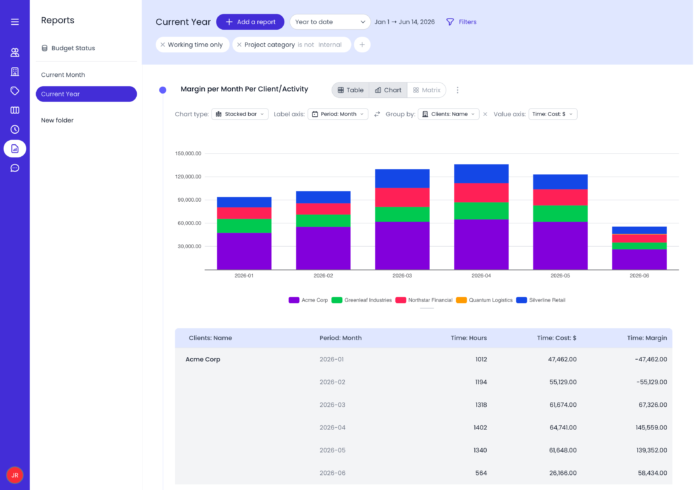
- Layer 3 (Real-time reporting & integrations): Beebole offers powerful project budget management and reporting with native integrations that help weave it right into your current tech stack. Two standouts include Google Sheets and Excel, which can power live financial dashboards without messy CSV reports. Beebole also supports multi-currency reporting for global teams.
Beebole’s key features
- Flexible billing methods — hourly, daily, fixed fee, or non-billable — configurable at the organization, tag, project, or person level
- Separate cost and billing rates to calculate true project margins, not just revenue
- Project budgets set on billing amount, cost amount, or hours, split by person or subproject for granular tracking
- Real-time budget burn indicator, with automatic alerts at 80% and 100% of budget consumption
- Expense management by type, scoped to a project or person, right alongside time and billing data — no separate tool required
- Custom fields and custom reports to tag and analyze cost and budget data by whatever dimensions matter to your business
- Multi-currency billing and cost tracking for international teams
- Multilevel approval workflows with quorum settings for timesheets and expenses
- Integrations with QuickBooks Online and Xero to carry cost and billing data into your accounting stack
- Direct Google Sheets and Excel integrations for one-click, refreshed financial reporting — no manual CSV exports
User feedback
- G2 Rating (2026): 4.7/5
- Praised for: easy configuration, powerful reporting, flexible billing
- Criticism: No native invoicing features
Pricing snapshot
- Free trial available, no credit card required, and a free plan is available for up to 5 users
- Paid plans start at $9/user/month billed annually (Essential); Advanced is $18/user/month and adds cost & profitability tracking, expense tracking, and project budgets — still mid-market friendly compared to enterprise PSA tools like Kantata or NetSuite OpenAir
👉 Best for: Agencies, consultancies, and enterprises that need clarity on project costs, accurate budget forecasts, and financial reporting without building manual spreadsheets
2. Harvest
⭐ 4.5 G2, 4.6 Capterra
Harvest is primarily a time tracking tool with light cost features, making it a fit for smaller agencies and consultants. It provides solid Layer 1 cost tracking and some Layer 2 functionality, but its reporting depth falls short of enterprise needs.
Three-layer fit
- Layer 1 (Cost tracking): Strong time and expense logging
- Layer 2 (Budget forecasting): Limited—only basic budget alerts
- Layer 3 (Reporting/integrations): Integrates with QuickBooks, Xero, and Stripe, but reporting is relatively simple
Key features
- Quick and intuitive time + expense logging
- Built-in invoicing for clients
- Integrates with task tools (Asana, Trello, Basecamp)
User feedback
- G2 Rating: 4.3/5
- Users highlight ease of use and invoicing but note weak analytical reporting
Pricing snapshot
- Free for 1 user
- Paid plans at $12 per seat/month
👉 Best for: Freelancers, consultants, and small teams needing straightforward time + expense management with minimal setup
3. TMetric
⭐ 4.6 G2, 4.5 Capterra
TMetric is a time tracking tool with built-in cost-control features, making it a good fit for teams that need both time tracking and budget visibility. It covers Layer 1 thoroughly and offers solid Layer 2 capabilities, while providing practical (though not deeply advanced) Layer 3 reporting.
Three-layer fit
- Layer 1: Time tracking with billable rates and expense tracking
- Layer 2: Project budgets, cost tracking, and real-time alerts
- Layer 3: Integrates with tools like QuickBooks, Jira, and Asana; reporting is detailed but not enterprise-grade
Key features
- Time tracking with billable rates and project cost calculation
- Project budgeting with real-time tracking and invoicing
- Team productivity insights with timesheets and time off
User feedback
- G2 Rating: 4.6/5
- Users praise ease of use, detailed time tracking, and budget control features, though some note limited advanced analytics compared to larger platforms
Pricing snapshot
- Free plan available for teams of 2
- Paid plans start at $7 per user/month
👉 Best for: Small to mid-sized teams and agencies that need reliable time tracking combined with projects, budget management, billing, and invoicing
4. Celoxis
⭐ 4.5 G2, 4.4 Capterra
Celoxis is a project cost tracking and portfolio management platform built for teams that need strong visibility into budgets, resources, and profitability across multiple projects. It delivers solid Layer 1 and Layer 2 capabilities, with advanced Layer 3 reporting and forecasting suited for growing and enterprise teams.
Three–layer fit
- Layer 1: Time tracking, expense tracking, and billable rate management
- Layer 2: Project budgeting, cost tracking, and real time profitability analysis
- Layer 3: Advanced reporting, portfolio dashboards, and integrations with tools like QuickBooks, Jira, and Slack
Key features
- Project budgeting with real time cost and revenue tracking
- Time and expense tracking linked directly to project financials
- Resource and capacity planning to optimize utilization and reduce cost overruns
User feedback
- G2 Rating: 4.5/5
- Users highlight strong reporting, accurate cost tracking, and portfolio visibility, while some mention a learning curve due to the depth of features
Pricing snapshot
- Free trial available; paid plans start at $10 per user/month
👉 Best for: Mid-sized to enterprise teams that need reliable project cost tracking combined with resource management, budgeting, and profitability insights
5. Mavenlink (Kantata)
⭐ 4.4 G2, 4.5 Capterra
Rebranded as Kantata, Mavenlink is designed for professional services organizations (PSOs) where utilization and profitability matter. Offers enterprise-grade Layers 1 and 2, with strong forecasting, but reporting is heavier and best suited for large teams.
Three–layer fit
- Layer 1: Robust time, cost, and resource logging
- Layer 2: Advanced forecasting and margin management for professional services
- Layer 3: Enterprise dashboards with integrations, but requires training to use fully
Key features
- Resource optimization + utilization analytics
- Deep financial forecasting for service-based firms
- Integrations with Salesforce, NetSuite
User feedback
- G2 Rating: 4.2/5
- Users value forecasting accuracy, but mention a steep learning curve
Pricing snapshot
- Enterprise-oriented, pricing on request. Reported starting at $59/user/month
👉 Best for: Mid-size and enterprise services firms that need detailed utilization and profitability analysis
6. Smartsheet
⭐ 4.4 G2, 4.5 Capterra
Smartsheet brings spreadsheet familiarity with PM dashboards, making it popular among organizations tied to Excel/Google Sheets. Its flexibility allows cost tracking templates, but forecasting requires customization.
Three–layer fit
- Layer 1: Spreadsheet-style time and cost tracking
- Layer 2: Budgeting possible with formulas but not automated (compare to Beebole, where budget burn is flagged automatically in real time — no spreadsheet formulas to maintain)
- Layer 3: Advanced dashboards exist, but manual-heavy reporting
Key features
- Budget and cost tracking templates out of the box
- Flexible dashboards for reporting
- Integrates with Microsoft 365/Google Workspace
User feedback
- G2 Rating: 4.4/5
- Strength: flexibility; Weakness: complexity at scale
Pricing snapshot
- Pro plan from $7/user/month, Business plan $25/user/month
👉 Best for: PMs already using spreadsheets who want a familiar but more scalable system
7. monday.com
⭐ 4.6 G2, 4.7 Capterra
monday.com isn’t natively a cost tracking platform, but it can be configured for it with add-ons and formulas. Strong visualization options make it appealing to PMs wanting oversight without deep finance integration.
Three–layer fit
- Layer 1: Can track costs via custom fields
- Layer 2: Limited, setup is manual
- Layer 3: Good visualization (Gantt, Kanban), weaker in finance integrations
Key features
- Task management + cost tracking fields
- Highly visual dashboards
- Marketplace add-ons for expenses/budgeting
User feedback
- G2 Rating: 4.7/5
- Teams love UI but criticize cost control limitations
Pricing snapshot
- Free tier
- Paid plans start at $9/user/month
👉 Best for: Teams already using monday.com who want basic cost visibility without switching platforms
8. Wrike
⭐ 4.3 G2, 4.4 Capterra
Wrike delivers strong mid-to-enterprise level cost tracking and forecasting, with customizable workflows. However, the complexity can overwhelm smaller teams.
Three–layer fit
- Layer 1: Solid task/cost setup with custom fields
- Layer 2: Available at higher tiers (Business/Enterprise)
- Layer 3: Reporting integrates with finance tools, but requires admin support
Key features
- Robust workflows + automated approvals
- Customizable financial fields
- Integrations with accounting/finance platforms
User feedback
- G2 Rating: 4.2/5
- Users cite steep setup/admin demands
Pricing snapshot
- Free plan for small teams
- Business plan from $24.80/user/month
👉 Best for: Larger enterprises with dedicated admins needing tailored financial workflows
9. Zoho Projects
⭐ 4.2 G2, 4.3 Capterra
Zoho Projects serves startups and SMBs with low-cost project cost tracking, especially if paired with Zoho Books.
Three–layer fit
- Layer 1: Strong for basic cost/time tracking.
- Layer 2: Limited forecasting.
- Layer 3: Reporting exists but relies on Zoho ecosystem.
Key features
- Seamless integration with Zoho Books/Expense
- Invoicing automation possible inside Zoho suite
- Affordable entry point
User feedback
- G2 Rating: 4.3/5
- Valued for affordability, limited scalability
Pricing snapshot
- Free for up to 3 users
- Paid from $5/user/month
👉 Best for: Startups and SMBs who want affordable, ecosystem-based cost tracking
10. ClickUp
⭐ 4.7 G2, 4.7 Capterra
ClickUp promises to replace multiple tools, offering light cost tracking among a wide feature stack. Ideal for teams focused on tasks and productivity, less so for financial clarity.
Three–layer Fit
- Layer 1: Can log costs via custom fields
- Layer 2: None natively
- Layer 3: Good visual dashboards, weak financial integrations
Key features
- Task/project management
- Customizable fields for costs
- Integration marketplace
User feedback
- G2 Rating: 4.7/5
- Loved for versatility; not suitable as primary financial tool
Pricing snapshot
- Free forever tier
- Paid from $7/user/month
👉 Best for: Teams who want cost visibility baked into an all-in-one tool without demanding financial depth
11. NetSuite OpenAir
⭐ 4.2 G2, 4.3 Capterra
NetSuite OpenAir is a full PSA (Professional Services Automation) platform with ERP-level depth. Built for enterprise organizations, it covers all Three Layers but at a high cost.
Three–layer fit
- Layer 1: Enterprise-grade logging
- Layer 2: Advanced forecasting + utilization modeling
- Layer 3: Deep ERP-level financial reports and integrations
Key features
- Global resource planning
- End-to-end project financial management
- Revenue recognition support
User feedback
- G2 Rating: 4.0/5
- Powerful, but “overkill” for smaller orgs
Pricing snapshot
- Enterprise pricing, typically $49+/user/month, varies by deployment
👉 Best for: Large enterprises scaling with complex financial/project needs
12. Microsoft Project
⭐ 4.3 G2, 4.4 Capterra
Microsoft Project remains relevant in legacy-heavy environments that require MS-native solutions. While powerful in scheduling and cost controls, the UX lags behind modern SaaS.
Three–layer fit
- Layer 1: Strong scheduling and task budgets
- Layer 2: Forecasting possible, but heavily manual
- Layer 3: Limited unless tied into Power BI/Excel
Key features
- Deep scheduling + critical path analysis
- Native integration with MS stack
- Resource/cost allocation
User feedback
- G2 Rating: 4.1/5
- Robust but clunky user experience
Pricing snapshot
- Microsoft Project Plan 3 from $30/user/month
👉 Best for: Large organizations standardized on Microsoft stacks, especially IT/engineering
FAQ: Project cost tracking
Which tool is best for tracking project costs and billing rates across multiple clients?
Beebole. It’s built for agencies, consultancies, and enterprises that need flexible billing options (hourly, fixed, or non-billable). Harvest is a close second, but it’s less customizable at scale.
What’s the cheapest project cost tracking tool?
Zoho Projects ($5/user/month) and Beebole ($9/user/month billed annually) are on the lower end of paid options. Free tiers: Beebole (up to 5 users), Harvest (1 user), and ClickUp (forever plan).
What’s the best project cost tracking software with Google Sheets or Excel integration?
Beebole. Its real-time reporting connects directly with both Excel and Google Sheets, giving you clarity without manual exports. Smartsheet offers spreadsheets too, but Beebole is designed for financial reporting, not just task lists.
How do PMs avoid budget overruns?
Use a tool with built-in budget forecasting. Beebole lets you set budgets on projects (choosing between billing amount, cost amount, and hours), and you get alerted when projects are getting close to going over. Wrike and Kantata offer similar features, but they’re heavier and enterprise-priced.
Related: Discover how Rancho Biosciences uses Beebole to avoid project cost overruns as they manage 100 projects at once.
What about tracking costs in multiple currencies?
Beebole supports multi-currency cost tracking, making it one of the few tools PMs on Reddit recommend for international teams.
Which tool handles multi-currency best?
Beebole supports multi-currency tracking. NetSuite OpenAir and SAP PS also handle this at enterprise scale.
Do any tools combine budgeting, accounting, and cost tracking?
ERP-adjacent tools (SAP PS, NetSuite OpenAir) do. For SMBs, pairing Beebole with QuickBooks Online or Xero covers it.
What about free project cost control software?
Beebole, Harvest, ClickUp, and Zoho Projects offer free tiers — but with limitations on users and forecasting.
Can I track project profitability in Excel?
Yes, but expect fragile formulas and manual upkeep. Beebole’s Excel add-in and Google Sheets add-on refresh report data with one click, so profitability numbers update without re-exporting CSVs.
Does Beebole handle expense receipts?
Yes. Beebole tracks expenses natively — by type, scoped to a project or person, alongside time and billing data.
Key takeaways
The top project cost tracking tools fall into three clear layers:
- Layer 1: Cost Tracking (where most tools live)
- Layer 2: Budget Forecasting (where PMs gain some control)
- Layer 3: Real-Time Reporting + Integration (where Beebole stands out)
Where to go from here:
- If you just need basic logging, tools like Harvest or Zoho Projects will do.
- If you need enterprise forecasting, Wrike and Kantata are contenders.
- But if you want all three layers in one tool — cost tracking, forecasting, and real-time reporting — Beebole is the software that consistently delivers across teams, clients, and currencies.
In other words, don’t settle for Layer 1 project cost tracking. Get to Layer 3 control. That’s how PMs keep projects profitable, predictable, and future-proof.

Katie is a digital marketer who researches and writes about project management, leadership, and best practices in business operations. She's on a mission to spread the word about the value of accurate and easy project time tracking. Through her interviews, research, and articles, Katie hopes to help professionals on their journey to a happier, more efficient work day.
Related posts

3 examples of Microsoft Copilot for financial planning & analysis
As artificial intelligence grows in popularity, every company is now competing to launch tools that leverage AI inside their existing apps. Microsoft’s launch of Copilot, an AI assistant tied into the Microsoft 365 ecosystem, plants their flag in the world of AI. It’s no surprise that you might be asking yourself: How can I integrate […]
Overcome the hidden hurdles of overtime cost analysis with this method
Today we’re diving right into overtime cost analysis. Fixed costs, such as rent, insurance, and salaries for regular full-time employees, are part of the cost of doing business for companies. These expenses remain constant regardless of changes in demand, production levels, or sales volume. But what about variable costs or expenses that vary with demand, […]

The art and science of financial forecast reliability: How to get it right
Financial forecasting is the process of making estimates about the future performance of a business or organization. These estimates are based on past performance, current conditions, and trends. Financial forecast reliability is essential for businesses of all sizes. This allows them to make informed decisions about investments, operations, and strategies. What factors affect financial forecast […]