

- The service time_entry.export initiates and launches an export job. This job is queued and processed in the background. The service’s response will be a new job object. The job object is composed of a unique ID, its status, and, if it has been completed, a result.
- If the previous service doesn’t respond with a result, the service time_entry.get_job_info will be used to query the job status and get the final result. As for the export service, it will return a job object.
- call the service time_entry.export to initiate a new export job and receive a new job ID.
- call the service time_entry.get_job_info periodically (every 5 sec) in order to check if the job has been done and if the response contains a result. You should exit the loop on a service status or a job.status == “error”, or when the job.status == “done” and job.result is of type string.
Export Time Entries
This service initiates a new export job. This job is queued and processed in the background. The service wraps the in app export module functionality. **Parameters: **- “from” and “to”
- “show” and “keys”: these two parameters are linked. The “show” parameter represents what kind of report you want to get. Depending on the “show” parameter, you will adapt the “keys” parameter, which represents the columns you want to export.
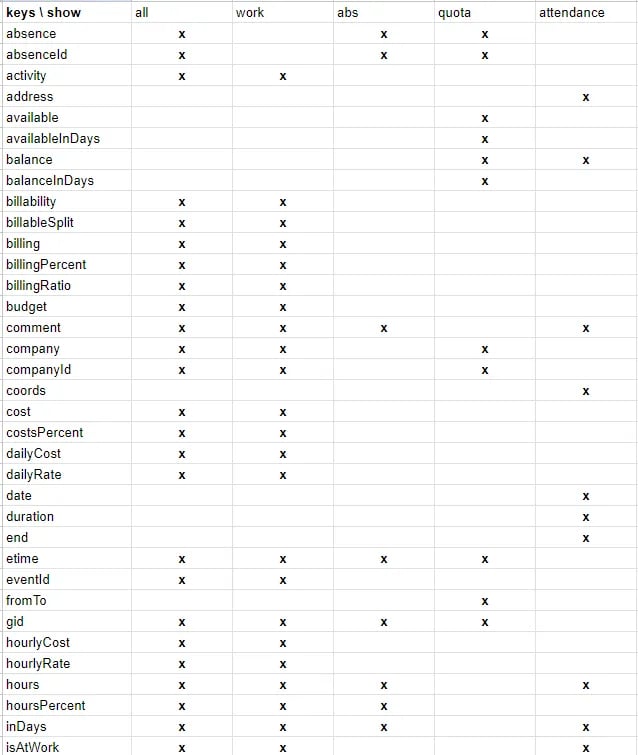
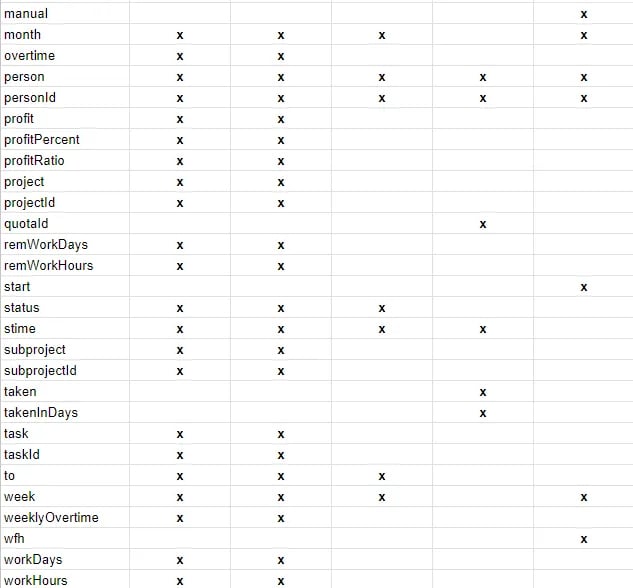
- “statusFilters”: this represents the time record filter.
- “gids”: this represents the groups filter, and array of integer group IDs.
- “outputFormat”: “array”: this parameter is optional. It allows you to export the result as an array of arrays instead of CSV.
Get Job Info
Request:Case Study: A Custom API Integration by Taptu
The Beebole customer and IT advisory Taptu shares their insights on custom integrations.