Build custom integrations with Beebole using the GraphQL API. Read and write your account data programmatically to connect Beebole to any tool.
Beebole’s GraphQL API lets you build custom integrations that connect Beebole to any tool or internal system your organization uses. When the built-in integrations don’t cover your needs, the API gives you full programmatic access to read and write your Beebole account data.This page is a starting point. For endpoints, authentication details, queries, and mutations, see the API introduction.
Every person in Beebole has a personal API key that authenticates their API requests. Beebole creates it the first time you open Your API key, and it does not expire. The key acts with your own role and permissions, so an integration can read and change only what you can.
1
Open your API key
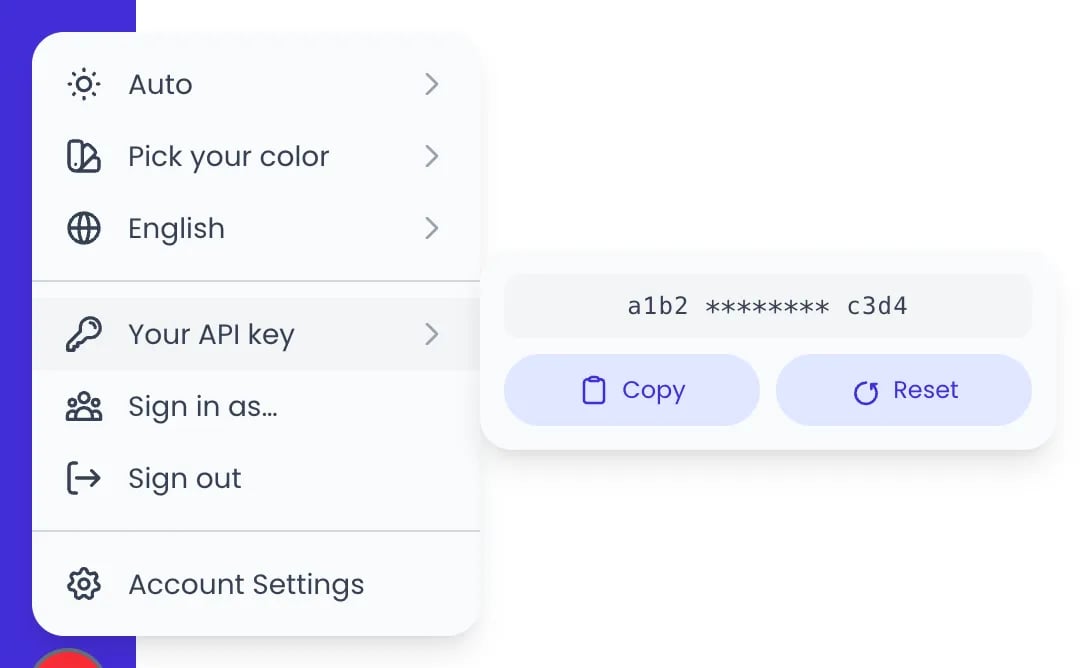
Click the button with your initials at the bottom of the sidebar, then hover over or click Your API key.
2
Copy the key
Click Copy to copy your API key to the clipboard.
Your API key, in the menu of the initials button
3
Authenticate your requests
Include the key in your API requests as described in the API introduction.
Keep your API key secure. Don’t include it in client-side code or commit it to public repositories — store it in an environment variable or a secrets manager. If a key is compromised, click Reset to revoke it and generate a new one.
Start with the API introduction and the API pages that follow it. They cover authentication, the schema explorer, queries, and mutations.
2
Explore the schema
Use the schema explorer to browse all available types, queries, and mutations. This helps you understand the data model before writing your integration.
3
Build and test your integration
Start with simple queries to read data, then move to mutations when you are ready to create or update records. Every mutation changes your live Beebole data, so try it on a few records before you run it on all of them.
Start with a read-only integration (queries only) to validate your data mapping before writing data back to Beebole.
Give the projects and people your integration creates clear names, so they are easy to recognize in Beebole.
Check both the errors array and the permissionsErrors array in every response. When a request asks for data or an action your role doesn’t allow, Beebole leaves those fields out and lists them in permissionsErrors instead of failing the whole request.
Click the button with your initials at the bottom of the sidebar, then hover over Your API key. Your key is shown there with Copy and Reset actions. Beebole creates one key per person the first time you open it, and it does not expire.
What programming languages can I use?
Any language with an HTTP client. The Beebole API uses standard GraphQL over HTTPS, so Python, JavaScript, Ruby, Go, Java, and others all work.
Can I create time entries through the API?
Yes. The Beebole API supports mutations for creating and updating time entries, projects, people, and other records. See the API introduction for details.
What happens if I reset my API key?
In Beebole, resetting revokes your current key and generates a new one. Any integration using the old key stops working until you update it with the new key, so reset only when you need to rotate a compromised key.
What can an integration access with my API key?
The same data you can access in Beebole. Your API key acts with your own role and permissions, so an integration can read and change only what you can. Fields your role doesn’t cover are left out of the response and listed in permissionsErrors.
Was this page helpful?
⌘I
Assistant
Responses are generated using AI and may contain mistakes.