

Table of Contents
Like our content?
Prefer us on Google.
Add as preferred Prefer us on Google.
source on Google
Beebole is a key staple of our back office operations.

Time theft and timesheet fraud both involve employees being paid for hours they didn’t actually work, although they differ in scale and intent. But the bottom line is that incorrect timesheet practices cost businesses about 7% of annual payroll, according to U.S. Department of Labor estimates. Let’s look at the differences and see how they can both have a significant impact on any business.
Time theft explained: Misused or unproductive work hours
Time theft happens when employees use paid work time for non-work activities or misrepresent when they’re actually working. It can be unintentional (arriving late, leaving early, taking longer-than-approved breaks) or more deliberate, like using work hours for personal tasks. If an employee “loses” about 4.5 hours every week, that translates to six full weeks a year of paid time that isn’t driving any work forward.
Timesheet fraud explained: Intentional deception for financial gain
Timesheet fraud involves deliberately falsifying time records: inflating hours, buddy punching for absent coworkers, logging regular hours as overtime, or manipulating break or shift data. While time theft can be accidental, timesheet fraud is always intentional deception to earn pay for work that wasn’t done.
What can you do?
The lazy fix is heavy surveillance. The smarter fix is transparent, consent-based time tracking with airtight approvals, strong reporting, and integrations your team will actually use. That’s what our article will focus on below as we walk you through practical ways to prevent time theft and fraud, and share our hand-picked list of the top 10 tools that solve the problem without turning your tech stack into boss-ware.
If your goal is to clean up leakage, increase billable utilization, and stay on the right side of employee privacy, you’re in the right place.
TL;DR: What you’ll learn
- Stop time theft with clear processes, alerts, audit trails, & submission discipline
- Avoid micromanagement by disabling invasive features, setting transparent policies, explaining the reasoning behind time tracking, and giving employees more control
- Best tools broken down by needs:
- Best overall: Beebole—granular setup, easy approvals + deep project/cost reporting + privacy-first controls.
- Jira shop: Tempo Timesheets
- No-surveillance + auto capture: Timely
- Time + invoicing simplicity: Harvest
- Deep PM embeds (Asana/Jira/Trello/Basecamp): Everhour
- Surveillance time tracking: Desklog
- Enterprise compliance & complex approvals: Replicon
- Clean UX, anti-spy stance: Toggl Track
- All-in-one for SMB/agency: Paymo
- Already on Zoho: Zoho Projects
- Services orgs needing audit controls: ClickTime
The criteria for the best project time tracking tools to prevent time theft
The challenge of balancing project time tracking with employee trust has never been more important. More now than ever, companies need time tracking tools that not only improve project efficiency but also protect individual privacy. The best solutions go beyond simple clock-ins—they provide transparent insights, prevent time theft, and foster accountability without invasive surveillance. Today, we’ll explore the top project time tracking tools of 2026 that achieve this delicate balance.
To do this, we’ve handpicked tools that:
- Are easy to implement and can adapt to any team’s needs
- Offer reporting functionality that leads to better business insight without individual surveillance
- Offer automated approval workflows
- Take security and compliance seriously & have transparent data practices with clear employee consent, personal data access, and opt-in tracking features
- Don’t cross any employee privacy lines
- Offer seamless integrations with existing project management tools
What are the best time tracking tools that prevent time theft without surveillance?
1. Beebole
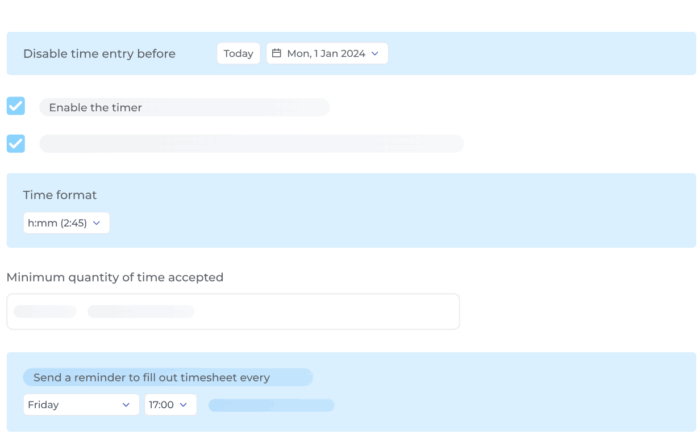
What it is: Flexible, privacy-respecting project time tracking software with granular permissions, an approval module that makes it easy to spot and rectify anomalies at a glance, and reporting your CFO won’t side-eye.
Best for: Project time tracking with approvals/locks, granular reporting, and APIs in SMB/mid-market
Not for: Full PM suite or payroll replacement
Key features: Approvals queue, lock/unlock hours, reminders, project cost & billable reporting
Privacy stance: Process controls (approvals/locks) instead of surveillance, compliance options (SOX/DCAA toggles)
Approvals/locks: Native approvals and lockable periods
Reporting: Project/time/cost breakdowns, export
Integrations: QuickBooks, Jira, Asana, Slack, BambooHR, and more via open API + Zapier/Pipedream
Beebole is a centralized point for us. We pull through the API into other applications that then use this knowledge as a main source for a lot of decisions. If we had to do this process without Beebole, it would be a lot of pain. Having an application with people, basic reporting, and an API to get data when needed was a big help to upscale the whole story with little investment.
Pros
- Easy approvals without invasive monitoring
- Robust, drill-down reporting for projects, costs, billability, margins & more
- GDPR-friendly controls, clear consent flows, and no “boss-ware” gimmicks
Cons
- Designed for teams and group functionality, so not an ideal option for freelancers
- Not a full PM suite by design—but it pairs with your PM tool of choice
HungaroTrial’s managers relied on inconsistent self-reported hours, leading to inaccurate planning and missed details. With Beebole’s project time tracking data and an Excel-synced resource planner, they finally gained precise visibility into hours worked versus planned. Now they can spot delays, identify top performers, and make confident hiring decisions. Want to see how they made it happen?
2. Toggl Track
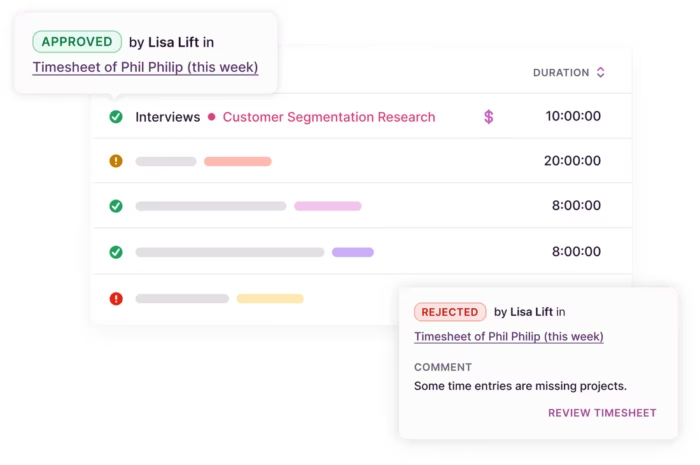
What it is: Timesheets with a strong anti-surveillance stance and clean UX teams actually use.
Best for: Teams wanting approvals/locks and an explicit anti-surveillance stance
Not for: Heavy resource management
Key features: Timesheet approvals, locked time entries, required fields
Privacy stance: Public anti-surveillance policy (no screenshots, keystrokes, webcam)
Approvals/locks: Submit, approve/reject, approval locks entries; workspace-level lock dates
Reporting: Built-in detailed/summary reports
Integrations: 100+ (Asana, Jira, Salesforce, etc.; browser extension and API)
Pros
- Publicly anti-screenshot/anti-keystroke, good cultural fit for privacy-minded orgs
- Simple approvals on higher tiers, easy adoption across non-technical teams
- Solid project budgeting and audit-ready reports
Cons
- Advanced workflows and permissions live on pricier plans
- Limited native resource management compared to heavier suites
3. Timely (by Memory)
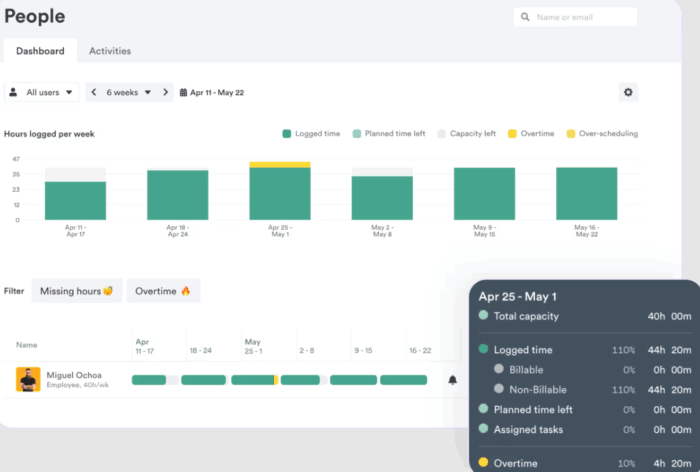
What it is: Automatic time capture that helps eliminate “I forgot to start the timer,” without turning into spyware.
Best for: Automatic capture with user-level privacy, light approvals via Time Entry States
Not for: Complex multi-level approval chains out of the box
Key features: Automatic “Memory” timeline, customizable entry states to review/finalize
Privacy stance: Explicit anti-surveillance, private Memory timeline, no screenshots
Approvals/locks: Entry States enable review/approval and can trigger locking
Reporting: Standard project/time reports
Integrations: Connectors and automation options
Pros
- Auto-capture of work activity with user control, no covert screenshots
- Strong candidate for knowledge-work teams that context-switch all day
- Clean reporting with project budgets and capacity views
Cons
- Automatic suggestions still need human review
- Deep, hierarchical approvals may need process workarounds
- Pricing can add up at scale vs. manual trackers
4. Harvest
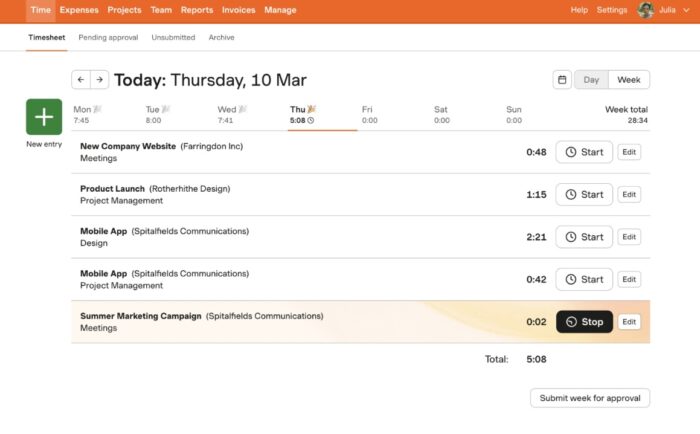
What it is: Time + expenses + lightweight invoicing that finance teams appreciate
Best for: Time + expenses with straightforward submission/approval and weekly locks
Not for: Highly customized approval matrices
Key features: Timesheet submission & approval, admin/manager permissions
Privacy stance: Traditional timesheets, no employee-monitoring features advertised in docs
Approvals/locks: Approval locks the week; admins can withdraw approval to edit
Reporting: Client/project/budget reports and exports
Integrations: Broad ecosystem (accounting/PM via native + CSV)
Caveats: Week-based cadence; advanced approvals limited.
Pros
- Built-in timesheet approvals and lock-downs for billing confidence
- Easy invoicing and integrations (accounting, PM, and CRM tools)
- Straightforward UI that makes it easy to use
Cons
- Approval routing is simpler than enterprise tools
- No automatic time capture; relies on user discipline
5. Desklog
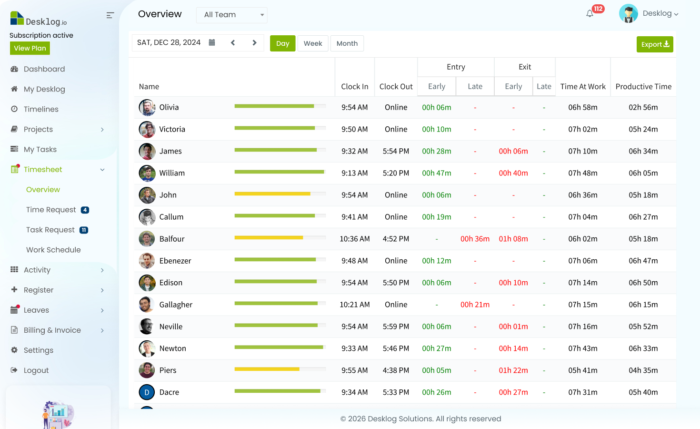
What it is: Automated time tracking and workforce visibility software to prevent time theft and improve accountability
Best for: Remote, hybrid, and on-site teams that need automatic tracking and built-in timesheets
Not for: Teams that need accounting or payroll solutions
Key features: Auto time tracking with idle detection, offline tracking with sync, automated project and task timesheets, activity timelines, attendance automation, and workforce data insights for smarter, data-driven decisions
Privacy stance: Desklog delivers GDPR-aligned encrypted security, role-based access, tamper-safe records, and full ownership and control of your workforce data. Note that Desklog can be used as an employee monitoring tool apart from just time tracking.
Approvals/locks: Auto-generated timesheets ready for review and export
Reporting: Productivity, attendance, billable vs non-billable and work-pattern reports
Integrations: Desklog integrates with Jira, Clickup, and Amazon S3
Pros:
- Free plan includes automated time tracking and timesheets
- Automated tracking reduces human error and time theft
- Offline capture prevents lost work hours
- High visibility into work patterns and idle time
Cons:
- Some advanced integrations may require higher-tier plans
- Limited functionality on mobile devices
6. Everhour
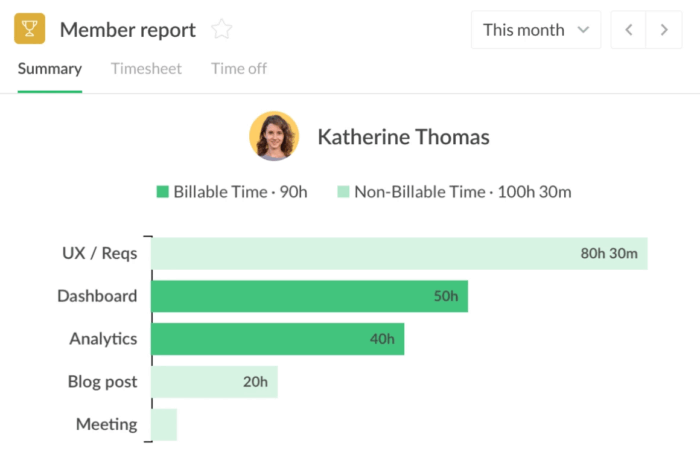
What it is: A tracker that embeds deeply into tools like Asana, Jira, Trello, and Basecamp.
Best for: Teams living in Asana/Trello/Jira with light approvals and edit locks
Not for: Standalone time tracking without connected PM tools
Key features: Time approval, lock time editing, connected projects
Privacy stance: Timesheets focus, no surveillance features promoted
Approvals/locks: Submit/approve and lock older entries, or after approval
Reporting: Budgets, estimates vs. actuals inside connected tools
Integrations: Deep, native integrations with major PM apps
Pros
- Native-feeling timers inside popular PM apps
- Timesheet approvals and project budgets with alerts
- No covert monitoring
Cons
- Shines most when paired with supported PMs, therefore less compelling standalone
- Reporting depth depends on your integration setup
7. Tempo Timesheets (for Jira)
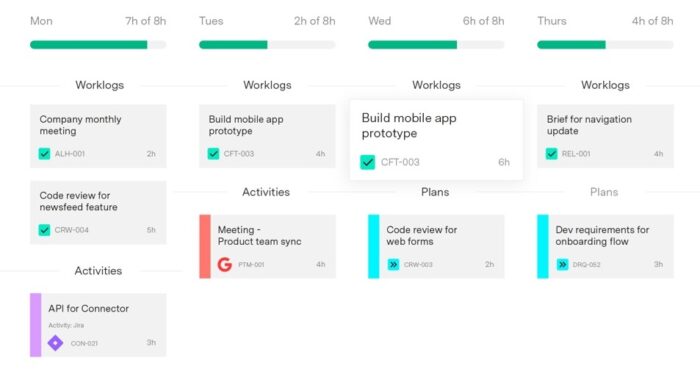
What it is: Jira-native time tracking built for product and engineering teams that live in Atlassian.
Best for: Jira-centric orgs needing formal approvals + Jira-native reporting
Not for: Teams outside Jira
Key features: Timesheet approvals, structured periods, Jira reporting
Privacy stance: Enterprise Jira App, no surveillance features, governed by Atlassian/Tempo policies
Approvals/locks: Submit/approve; users can’t edit submitted period; approval period closure
Reporting: Program/project/portfolio views, Financial Manager add-on
Integrations: Google/Outlook calendars, Slack, VS Code; Atlassian ecosystem
Pros
- Robust approvals and period closing aligned to sprint/epic work
- Rich permissioning and cost/billing mappings across projects
- Scales well for multi-team engineering orgs
Cons
- Best only if you’re already committed to Jira
- Admin setup can be heavy for smaller teams
8. ClickTime
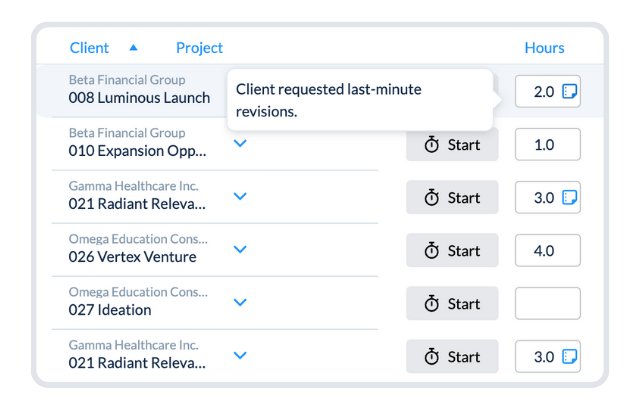
What it is: A timesheet platform with strong approval and audit features.
Best for: Finance/reporting teams needing audit trails and QuickBooks flows
Not for: Users who want ultra-light UX
Key features: Timesheet approvals, locking timesheets, audit trail
Privacy stance: Process/audit emphasis, no surveillance tooling in docs
Approvals/locks: Submitted timesheets are locked, granular lock options
Reporting: Detailed audit reports, DCAA options
Integrations: QuickBooks Online and others; API
Pros
- Multi-step approvals, timesheet locks, and policy controls
- Solid cost tracking and utilization reports for services orgs
- Broad integrations and exports for finance workflows
Cons
- UI feels more “enterprise classic” than modern startup sleek
- Configuration takes time to get right
- Some modules available at an extra cost
9. Replicon
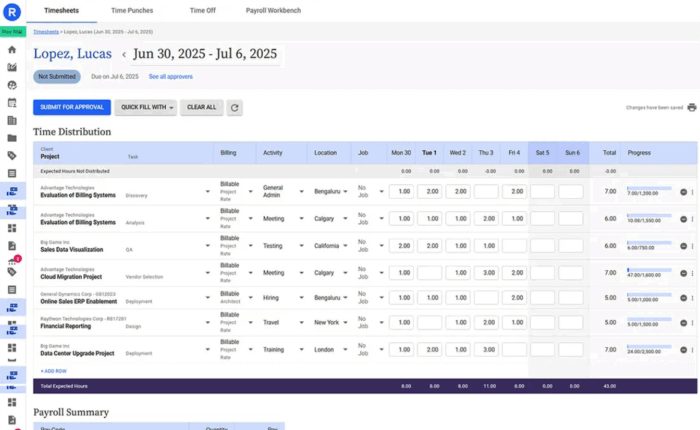
What it is: Enterprise-grade time intelligence with serious compliance options
Best for: Enterprises needing compliance, multi-level approvals, and advanced analytics
Not for: Very small teams
Key features: Customizable timesheets, multi-level approvals, validation rules
Privacy stance: Emphasis on security/compliance certifications
Approvals/locks: Multi-level approval workflows with policy controls
Reporting: Cost, utilization, billing, pay, forecasting
Integrations: Enterprise systems (Oracle, etc.), multiple integration paths
Pros
- Flexible approval paths, audit trails, and compliance tooling
- Global time/attendance + project time under one umbrella
- Strong role-based security and data governance
Cons
- Enterprise pricing and complexity can be overkill for SMBs
- Requires change management to fully leverage
10. Paymo
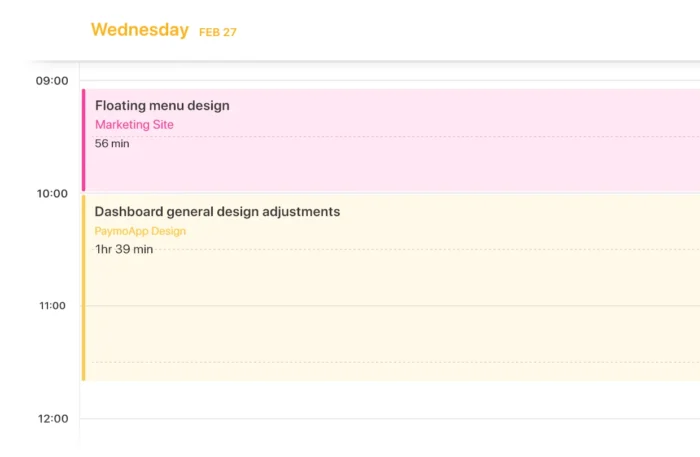
What it is: All-in-one PM + time tracking for agencies and small teams
Best for: Small teams wanting PM + time + simple approvals/reminders
Not for: Rigid multi-tier approvals
Key features: Time tracking (including Paymo Track), reminders, timesheet approvals
Privacy stance: Traditional timesheets; no surveillance tools
Approvals/locks: Enable approvals in company settings, notify approvers, (locking behavior varies by workflow)
Reporting: Live time reports and exports
Integrations: Core app ecosystem, invoicing built-in
Pros
- Timesheet approvals plus tasks, files, and invoicing in one place
- Good value for teams wanting a single app
- Easy budgeting and basic resource planning
Cons
- Not as deep as dedicated enterprise time suites
- Advanced analytics/reporting is limited
- Some edits remain possible unless you enforce strict approval cadence.
11. Zoho Projects
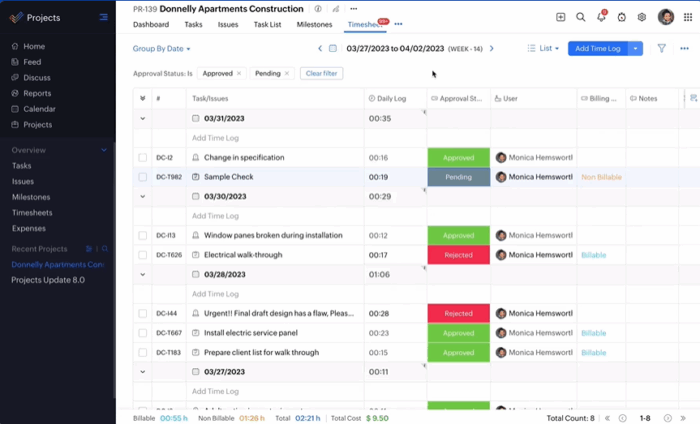
What it is: Time tracking within Zoho’s broader suite—best when you already use Zoho.
Best for: Teams on Zoho stack needing approvals + granular time-log restrictions
Not for: Non-Zoho environments wanting standalone time only.
Key features: Time Log Approval; restrictions for past/future, work-hour caps; reject workflow
Privacy stance: Timesheets inside PM suite, no surveillance
Approvals/locks: Mandate approvals, auto-approve options
Reporting: Standard PM/time reports, mobile approval
Integrations: Broad Zoho ecosystem + common third-party apps (varies by plan)
Pros
- Native timesheet approvals and user permissions
- Strong fit with Zoho Books/Invoice/CRM for end-to-end workflows
- Affordable tiers for growing teams
Cons
- Feature sprawl if you only need time tracking
- UI/UX can feel busy; reporting customization varies by plan
How do I choose a time tracking tool that avoids micromanagement?
The key here is to pick a tool that prevents bad data at the workflow level (i.e., making sure there are approvals, locks, and budget alerts) rather than policing individuals with things like screenshots and keystrokes. Your shortlist should have: multi-level approvals, period locks, role-based permissions, consent-first data controls, and project-level reporting. Give a tool you’re considering a try with one team for 30 days and judge success by on-time submissions, approval cycle time, billable utilization, and estimate variance.
What actually stops time theft?
Answer: Process beats surveillance. The platforms that actually work plug the leaks at submission and approval, not by spying on screens.
- Submission discipline: reminders, timesheet status views, mobile/web parity
- Approval control: Manager → project lead → finance, with period locks after sign-off
- Budget & threshold alerts: Catch padding when it happens, not months later
- Audit trails: Who changed what, when, and why
- Privacy by default: No screenshots/keystrokes, explicit consent, user data access
Beebole offers timesheet approvals + lockable periods. Make “oops, we’ll fix it next month” a non-issue—without resorting to surveillance. Plus, count on Beebole’s audit trails to have an exact record of what was logged when and by whom.
When we implemented Beebole it really clarified how different a perception people have of their own workload. Because it turned out that they weren’t working more than 5-6 hours a day that they could actually log in as working hours. Their perception was that they have so much to do, but they just weren’t working effectively.
What are the non-negotiable features for time tracking software that stops time theft?
Answer: These four features keep you compliant, accurate, and trusted.
- Timesheet approvals and configurations to define who reviews timesheets for each team member and/or project.
- Lockable timesheets so you can close weeks/months and prevent retro padding
- Role-based permissions so you know who can view/edit/approve time and costs
- Project-level reporting to deeply understand costs, billability, variance, and margin—not just hours
Beebole checks all four, with especially strong permissions and reporting.
Which data practices avoid micromanagement?
Answer: Treat time as business data, not employee surveillance.
- Explain the “why”: Focus on billable accuracy, forecasting, and fair workload—not “gotchas.”
- Disable invasive features: No employee is interested in stealth tracking or random screenshots.
- Set transparent policies so it’s clear who sees what data, and for how long.
- Give employees control so that they can view/edit their entries, see approvals, and request corrections.
In Beebole, teams get visibility into their own timesheets and approvals, which reduces the “black box” anxiety that kills adoption.
Handling time theft & timesheet fraud today and beyond
As we’ve seen, time theft and timesheet fraud stem from different behaviors and intentions, but both can drain productivity, inflate labor costs, and skew business decisions. It’s up to management to find the right tools to keep time tracking accurate and accountable—without compromising trust. The best systems don’t spy on employees; they empower them with clarity, fair expectations, and guardrails that prevent mistakes before they happen. At the same time, they give leaders the real-time insight they need to spot patterns, improve forecasting, control costs, and build healthier, more equitable teams.
When companies choose privacy-first solutions that motivate employees rather than monitor them, everyone wins: culture strengthens, data gets cleaner, and the business can make smarter decisions.

Katie is a digital marketer who researches and writes about project management, leadership, and best practices in business operations. She's on a mission to spread the word about the value of accurate and easy project time tracking. Through her interviews, research, and articles, Katie hopes to help professionals on their journey to a happier, more efficient work day.
Related posts

Time tracking integrations: Should you go low-code, no-code, or custom data integration?
Have you ever thought that you could be using your project time tracking data better in your organization? That you’re dealing with data silos and your teams could be more efficient with better integrated insights? If yes, it’s most likely time to talk about time tracking integrations. Just imagine this scenario: Without having to even […]

Transforming forecasting and risk management: A practical guide to xP&A implementation
In today’s rapidly evolving business landscape, organizations face an increasingly complex challenge: how to maintain accurate forecasting and effective risk management while navigating unprecedented levels of uncertainty. As US Economist Michael Hammer wisely noted, “The secret of success is not to predict the future but to create an organization which can prosper in an unpredictable […]

How to report absenteeism KPIs with an executive HR dashboard
Absenteeism KPIs are a crucial piece of executive HR dashboards because they shed light on trends and potential issues. Employees miss work from time to time due to different reasons, including being sick or even unplanned absences, and that’s how it should be. It’s unrealistic to expect them to report to work every day of […]